 USE CASES
You’ve seen it. A student signs up on a Monday, blazes through all six lessons by Wednesday, and emails you by Thursday: “I’ve finished everything — what’s next?” It sounds like engagement. It isn’t.
Binge learning feels productive to the student. It rarely produces results. And when results don’t follow, you get refund requests, bad reviews, and a quiet suspicion that your course wasn’t worth the price.
The problem isn’t your content. It’s that nothing is stopping them from consuming it all at once.

Humans are wired to finish things. The Zeigarnik effect — the cognitive pull to complete open loops — is real and strong. When a student sees six unlocked lessons in their dashboard, their brain immediately registers six open tasks. The urge to close them is automatic.
Add to that the dopamine hit from clicking “complete” or scrolling to the end, and you have a recipe for consumption without retention. Students aren’t binging because they’re motivated — they’re binging because digital content has no natural stopping point.
A physical textbook has weight. A classroom has an end time. Online courses have neither. Unless you build the friction in yourself, students will consume your course the same way they consume a Netflix series: in one anxious sitting that leaves them feeling vaguely empty.

Many course creators add a note in their welcome email: “We recommend one lesson per week for best results.” This is well-intentioned and almost entirely ignored.
A recommendation is not a constraint. If the content is there, some students will take it. The ones most likely to binge are often the most anxious learners — the ones who feel like they’re behind, who need to “get it done,” who are paying money and feel pressure to show progress fast. These are exactly the students who need pacing the most, and they’re the ones least likely to follow a suggestion.
Pacing has to be structural, not advisory. The course itself has to enforce the schedule.
A time lock removes the choice entirely. Students can’t binge Lesson 4 on day one because Lesson 4 doesn’t exist for them yet. The page is there — it loads — but the content isn’t visible until the unlock date arrives.
This does something subtle but important: it reframes the wait as part of the experience, not a failure of the platform. Students who see a countdown timer — “Lesson 3 unlocks in 3 days, 14 hours” — don’t feel cheated. They feel like the course is structured. Like someone thought about how they should learn, not just what they should learn.
That shift in perception is worth more than any welcome email.
Timed Content Locker handles this at the WordPress post level — no LMS, no membership plugin required. You set an unlock date on each lesson, choose who gets restricted, and every student hitting that URL before the date sees your locked message instead of the content.
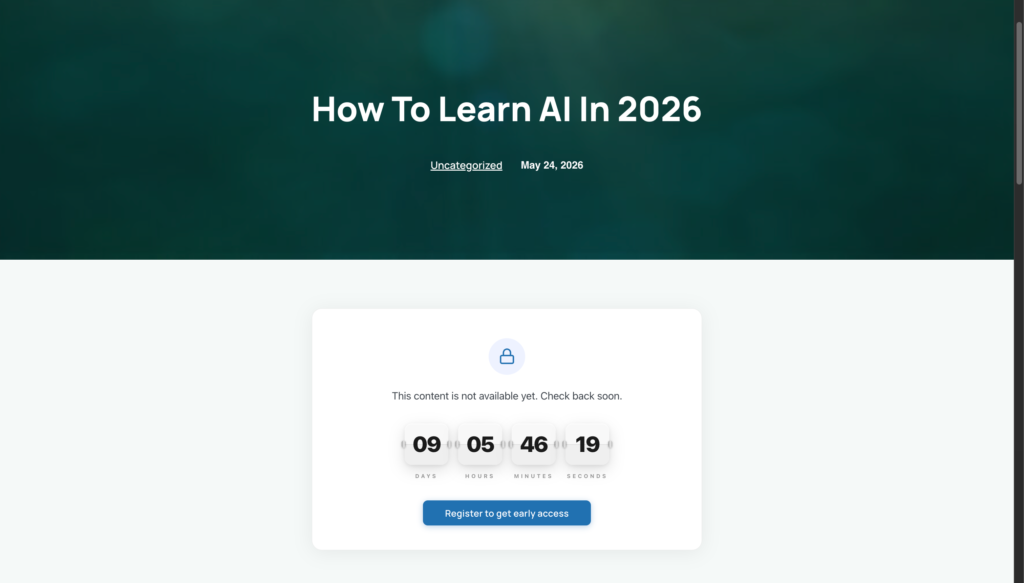
The latest version also supports unlocking content a set number of days after a student registers. That means self-paced evergreen courses are fully covered too — Student A who enrolls in January and Student B who enrolls in March both go through the same sequence at their own pace. No shared calendar date required. Every student gets the full intended pacing from the moment they sign up.
Not every piece of content needs a lock. A good drip structure typically looks like this:
Lock the lessons, not the orientation. Let students access your welcome video, course overview, and community links immediately. Friction at the very start breeds cancellations. Lock only the substantive lessons where pacing actually matters.
Space by learning cycle, not by calendar. If Lesson 2 requires students to practise something from Lesson 1, the gap needs to be long enough to actually practise. Three to seven days is typical for skill-based content. One to two days works for knowledge-heavy material that doesn’t need application time.
Use the countdown as motivation, not punishment. A timer counting down to an unlock feels like anticipation — like a release date for something worth waiting for. Use language that builds on this: “Your next lesson drops Tuesday. In the meantime, try applying [concept from Lesson 2] to your own project.”
Add a CTA on every locked screen. The locked screen isn’t dead space. Link it to your community, a worksheet, a reflection prompt, or a bonus resource. Students who are waiting productively are students who stay enrolled.
The goal of drip content isn’t to be difficult. It’s to protect the learning outcome — which is the thing that produces testimonials, referrals, and repeat purchases. A student who completes your course at the right pace, practises each skill before moving forward, and arrives at the final lesson having actually absorbed the earlier ones — that student gets results. That student leaves a review.
Install Timed Content Locker and set up your first drip sequence today — your future students will thank you for the structure, even if they don’t realise it yet.