
 TUTORIAL
Everybody who has styled a WordPress plugin knows the ritual. Open devtools, copy the selector the plugin used, paste it into Additional CSS, watch nothing happen, add a parent selector, watch nothing happen, add !important, move on with your life. Then the plugin updates, the markup changes, and your override styles an element that no longer exists.
The problem is not that plugin authors write bad CSS. It is that specificity is the only tool either side has, and it is a competition rather than an interface.
When a plugin reads every size, colour and radius from a custom property, its own stylesheet stops being a wall and starts being a default:
.wpmake-advance-user-avatar-container .avatar-preview {
    width: var( --wpmake-aua-avatar-size, 96px );
    height: var( --wpmake-aua-avatar-size, 96px );
    border-radius: var( --wpmake-aua-avatar-radius, 0 );
}
You are no longer competing with that rule. You are supplying the value it reads. Custom properties inherit, so setting one on the container is enough — and because you are not fighting a selector, specificity never enters into it:
.wpmake-advance-user-avatar-container {
    --wpmake-aua-avatar-size: 150px;
    --wpmake-aua-avatar-radius: 50%;
}
Two lines in Appearance → Customize → Additional CSS, no !important, and it applies everywhere the widget appears on the site.
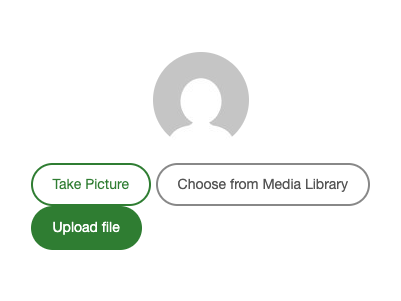
Here is the Advanced User Avatar uploader as it ships — deliberately plain, so it inherits whatever your theme does with buttons:

And here it is after one rule:
.wpmake-advance-user-avatar-container {
    --wpmake-aua-avatar-size: 150px;
    --wpmake-aua-avatar-radius: 50%;
    --wpmake-aua-btn-primary-bg: #2f7d32;
    --wpmake-aua-btn-primary-bg-hover: #27682a;
    --wpmake-aua-btn-capture-color: #2f7d32;
    --wpmake-aua-btn-radius: 999px;
    --wpmake-aua-btn-padding: 10px 20px;
}
Because custom properties inherit down the tree, a class on one instance is all you need to style that instance differently. The shortcodes accept a class attribute for exactly this:
.checkout-avatar {
    --wpmake-aua-avatar-size: 64px;
    --wpmake-aua-btn-font-size: 12px;
}
Site-wide rule on the container, per-placement rule on your own class. Neither one needs to know anything about the plugin’s internal markup.
The naming is consistent, which is half the value — you can guess most of them:
--wpmake-aua-avatar-size          --wpmake-aua-btn-primary-bg
--wpmake-aua-avatar-radius        --wpmake-aua-btn-primary-bg-hover
--wpmake-aua-avatar-spacing       --wpmake-aua-btn-primary-color
--wpmake-aua-width                --wpmake-aua-btn-capture-color
--wpmake-aua-height               --wpmake-aua-btn-capture-color-hover
--wpmake-aua-padding              --wpmake-aua-btn-remove-color
--wpmake-aua-align                --wpmake-aua-btn-remove-border
--wpmake-aua-btn-padding          --wpmake-aua-btn-remove-border-hover
--wpmake-aua-btn-font-size        --wpmake-aua-btn-remove-bg-hover
--wpmake-aua-btn-radius --wpmake-aua-btn-border-widthThree rules that cost almost nothing at authoring time and save your users hours:
:root. A single stable class name is a better public interface than your entire markup tree, and it means two instances on one page can differ.var() call. Then the widget still renders correctly if your stylesheet loads and the properties do not — and the fallback documents the default.The deeper point is about where the boundary sits. Markup and selectors are implementation, and a plugin should be free to change them in a minor release. A documented set of custom properties is a contract — one that survives refactors, needs no !important, and turns “how do I make this match my theme” from a devtools expedition into two lines of CSS.