
 PLUGIN COMPARISON
“Custom avatars” covers at least five different jobs, and half the frustration in this corner of WordPress comes from picking a solution built for a different one. Here are the real options, what each is genuinely good at, and how to tell which you need.
Details of third-party plugins are as of the time of writing and change between releases — check the current version before deciding.
Settings → Discussion lets you swap the grey silhouette for a generated pattern — Identicon, Retro, Wavatar — or turn avatars off entirely.
Good for: a blog with occasional comments, where the only goal is that two commenters look different from each other. It costs nothing and there is nothing to maintain.
Not good for: anything where a face matters, or where you would rather not make a third-party request per avatar. The patterns are still fetched from Gravatar.
The category represented by plugins like Simple Local Avatars and Basic User Avatars. They add an avatar field to the WordPress profile screen, store the image locally, and stop there. Small, stable, widely used.
Good for: a site where everyone who needs a photo has a WordPress login and is comfortable in wp-admin — an editorial team, an agency, a small business site.
Watch for: front-end coverage. If your users never see wp-admin — customers, members, students — an admin-only field is not a solution for them. Check too whether the plugin generates smaller copies for small avatar contexts, or serves the full-size upload everywhere.
Plugins like ProfilePress or a membership platform bring registration forms, login pages, profile fields, content restriction and member directories, with avatars as one feature among many.
Good for: sites that need the rest of it too. If you are building custom registration and gated content anyway, taking avatars from the same suite keeps everything consistent and is clearly the right call.
Not good for: sites that only want profile pictures. You are adopting a large plugin, its update cadence, its templates and often its pricing, for one feature. It is also the option most likely to conflict with whatever membership or store plugin you already run.
It is genuinely not much code to hook pre_get_avatar_data, read an attachment ID out of user meta, and return a URL. A competent developer can do the display half in an afternoon.
Good for: a bespoke build with unusual requirements — avatars from an external identity provider, a custom moderation queue, an existing table of photos you are migrating from.
Be honest about the other 80%: the display half is the easy half. The rest is a front-end upload form with nonce and capability checks, server-side type sniffing and size limits, a cropper that respects EXIF orientation, generated sub-sizes, a media library picker gated on upload_files, sensible behaviour when an attachment is deleted, and an admin screen for setting other people’s photos. That is not an afternoon, and every one of those items is a place to get security wrong.
The category Advanced User Avatar sits in: purpose-built for profile pictures, with a front-end uploader as the primary feature rather than an afterthought.
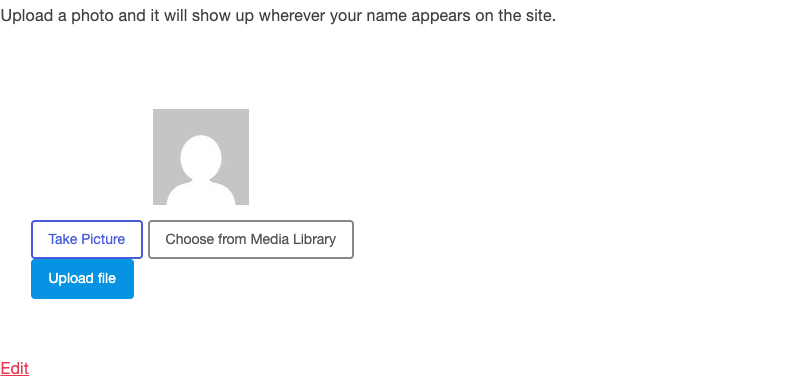
Good for: sites where the people who need photos are not administrators — stores, communities, membership sites, directories. Anywhere you want people to do it themselves.
Not needed for: a five-author blog. Option 2 is less software for the same result.
Most sites are choosing between options 2 and 5, and the deciding factor is almost always whether your users see the admin. Editorial team: take the small plugin. Store, community or membership site: take the one with a front-end uploader, because a profile picture feature nobody can reach is not a feature.
And whichever you pick, check one thing before you commit: does it supply avatars through pre_get_avatar_data, the filter WordPress itself uses? If it does, it will work in plugins nobody has written yet. If it builds a parallel system, it will need an integration for every one of them.