
 USE CASES
Open a busy comment thread on a stock WordPress site and watch the network panel. Every avatar is a separate HTTP request to secure.gravatar.com: a fresh DNS lookup, a TLS handshake, and then one image per commenter — most of which come back as the same grey silhouette, downloaded once per person.
None of this is catastrophic. It is also completely avoidable, and the argument for avoiding it has three parts.
The images themselves are small. The expensive part is the connection: your browser has to resolve a new hostname and negotiate a new TLS connection before the first avatar byte arrives. On a fast desktop connection that is tens of milliseconds. On a mid-range phone on mobile data it is routinely two to three hundred.
Serve the same images from your own domain and that whole setup cost disappears, because the connection is already open — it is the one that delivered the page.
A remote avatar is outside every performance tool you own. You cannot put it behind your CDN, you cannot set your own cache headers on it, you cannot convert it to WebP or AVIF in your build, and if the service is slow one afternoon, your pages are slow that afternoon. A file in your media library is subject to all of your usual optimisation, automatically.
This is the one that actually moves numbers, and it applies to self-hosted avatars too if you do it carelessly. An admin bar avatar is 26 pixels. A comment avatar is typically 48. If every one of those is served from a 500-pixel master image, you are shipping perhaps twenty times the pixels you display, and the browser throws the rest away.
Advanced User Avatar generates three extra square copies on upload — 32, 64 and 96 pixels — and WordPress picks the closest one for the context that asked. A 32-pixel avatar downloads a 32-pixel file of a couple of kilobytes instead of the full-size original.
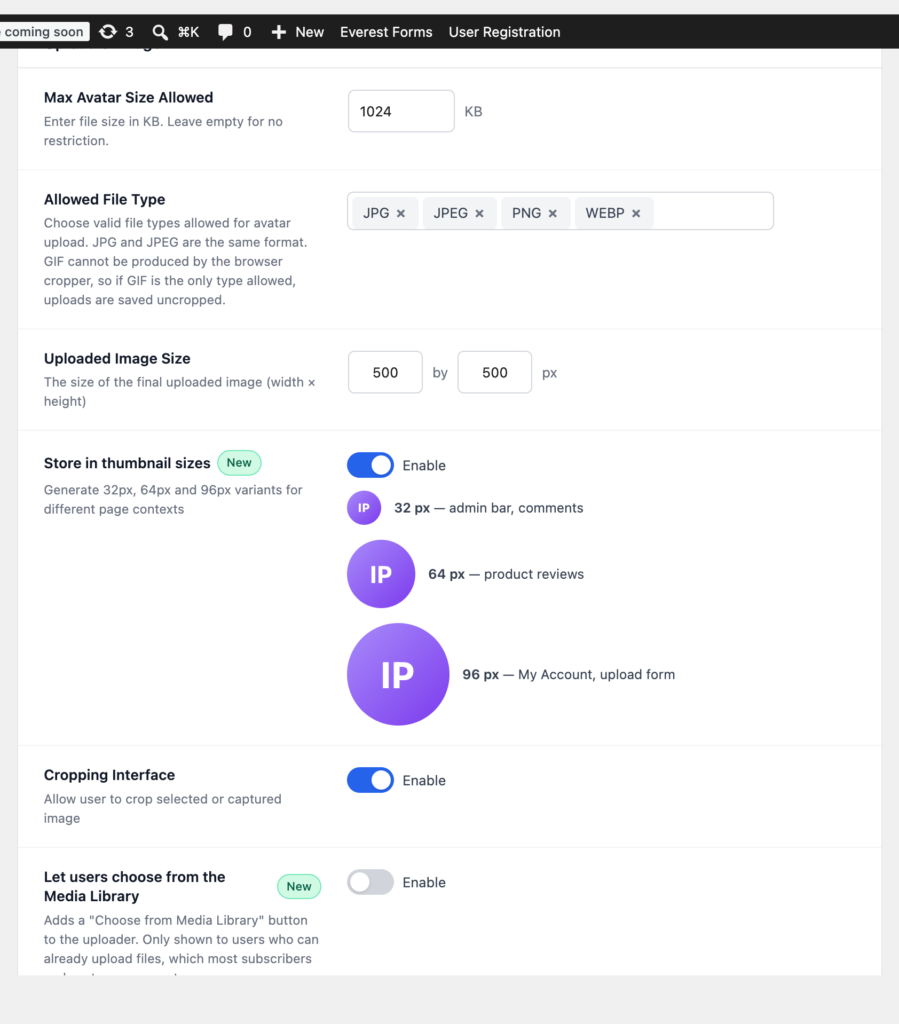
These sub-sizes are generated for avatar uploads only, so the rest of your media library does not grow extra files. On a page with a dozen avatars the saving is the difference between a few kilobytes and a few hundred.
Do not take anyone’s word for it, including this one. Pick a page with a lot of avatars — a comment thread, a members directory, a product with reviews — and record three things before and after:
The improvement scales with how many avatars a page renders. A single author box will barely move. A forum index with sixty faces on it is a different story.
An obvious objection: does adding an avatar plugin cost you more script than it saves? In this case, no. The uploader’s CSS and JavaScript load only on requests that actually render the widget, so an account page carries them and your home page does not. Webcam capture pulls an additional script, and only when that setting is switched on — which is one of the reasons it is off by default.
Pages that merely display avatars — comments, author boxes, the Users list — need no front-end assets at all. They are just <img> tags pointing at your own uploads directory.
Self-hosting avatars is not a dramatic performance win on a site with three avatars on it. On a community site, a store with reviews, or any page that renders faces in bulk, it removes an entire third-party origin from your critical path and cuts image weight by an order of magnitude — and it does so as a side effect of a change you probably wanted for other reasons anyway.