
 TUTORIAL
The question sounds like it has one answer and actually has two, and confusing them is why sites end up either with blurry profile headers or with 32-pixel admin bar avatars downloading half a megabyte each.
Worth knowing, because these are the numbers your storage decision has to serve:
get_avatar() when nothing says otherwise; most comment templatesThen double the top of that range for high-density screens. A 150-pixel avatar on a retina display wants 300 real pixels to look sharp.
That is the default in Advanced User Avatar, and it is a good one. It comfortably covers a 250-pixel profile header at 2× density, which is larger than almost any theme actually renders, while staying small enough on disk that a few thousand users do not become a storage problem.
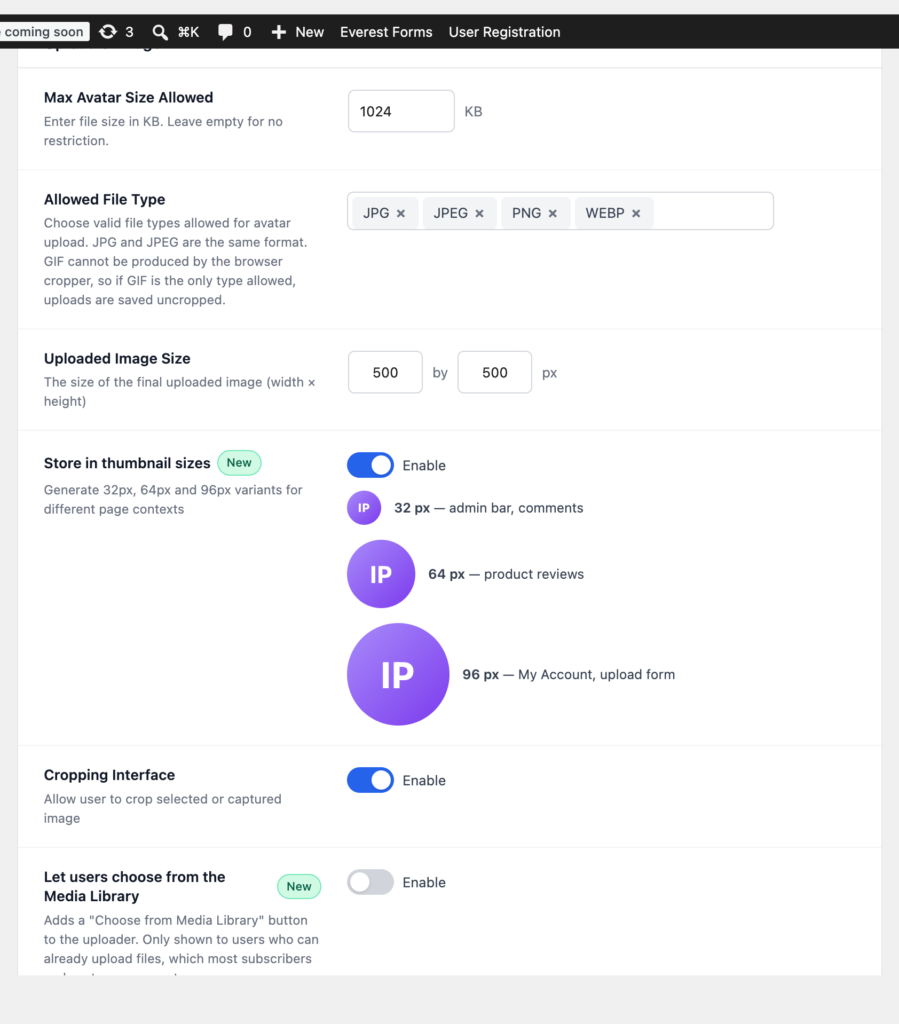
Reasons to go higher: you render avatars at 300 pixels or more somewhere prominent, or you expect to redesign into larger ones later and would rather not re-collect photos. 1000 × 1000 is a reasonable ceiling; beyond that you are storing detail that no context on a website will ever display.
Reasons to go lower: a very large user base and real storage pressure. 300 × 300 still covers a 150-pixel retina header. Below that you will start seeing softness on any layout that shows a face at a decent size.
Square, in every case. Avatars are rendered in square or circular frames everywhere in WordPress, and a non-square master just means something else decides the crop for you.
Here is where sites go wrong. If a 500-pixel master is the only file you have, then every avatar on your site is a 500-pixel download — including the 26-pixel one in the admin bar, where the browser discards 99% of the pixels it just fetched.
The fix is the Store in thumbnail sizes setting, which generates three extra square copies on upload — 32, 64 and 96 pixels — so WordPress can pick the closest one to what was asked for. Leave it on. The extra files are a few kilobytes each, and on a page with a dozen avatars the saving is substantial.
These sizes are generated for avatar uploads only, so nothing else in your media library grows extra files. If your theme renders large profile headers and you want a 192-pixel variant too, the list is filterable:
add_filter(
    'wpmake_aua_avatar_subsizes',
    function ( $sizes ) {
        $sizes['wpmake_aua_192'] = array(
            'width'  => 192,
            'height' => 192,
            'crop'   => true,
        );

        return $sizes;
    }
);Whatever size you pass to get_avatar() is what gets requested, so pass the size you actually render:
echo get_avatar( $user_id, 96 );The common mistake is asking for a large avatar and shrinking it with CSS, which downloads the big file and then hides the fact. The second most common is asking for exactly the CSS size and forgetting high-density screens — if you display at 96 CSS pixels, requesting 192 and constraining it in CSS is the sharper choice on a page where the avatar is prominent.
Get those four right and avatars stop being something you think about — which is the correct amount of attention for a profile picture to require.