
 USE CASES
Every client store solves post-purchase differently, because every client store was built at a different time by someone solving one urgent problem. Individually each choice was reasonable. Collectively they are the reason maintenance costs what it does.
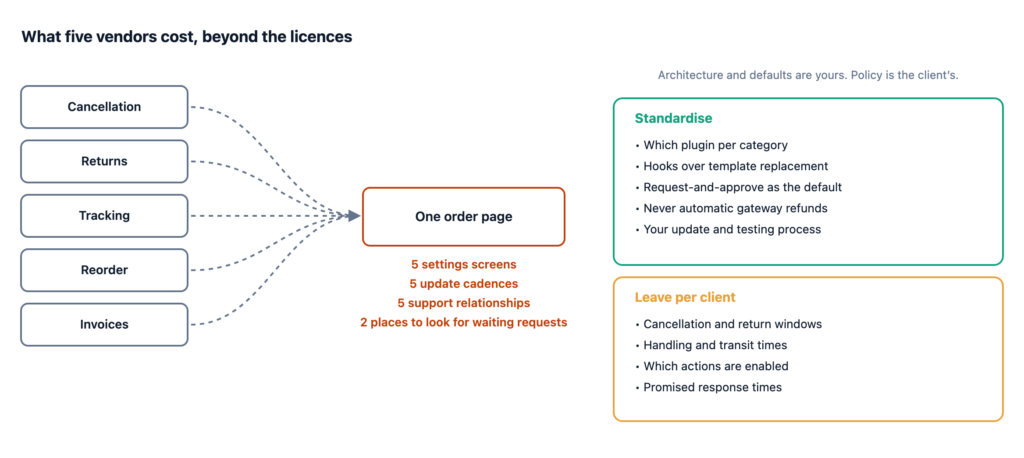
A complete post-purchase setup covers five categories, and they are usually five separate vendors:
What that costs is not primarily money. Licences are a line item a client can read. The costs that hurt are the ones that do not appear on any invoice.
In five different places in the admin, using five different conventions, with five different ideas about where WooCommerce settings belong. A client asking “where do I change the cancellation window?” is a ten-minute answer that you will give more than once.
Each vendor ships on its own schedule with its own quality bar. Across twelve client sites and five plugins, you are tracking sixty plugin-site pairs. The practical consequence is that you either update everything blind, or you do not update, and both are bad in different ways.
This is the expensive one. All five want the same real estate: myaccount/orders.php and view-order.php. Add a theme that also customises them — most commercial themes do — and you have six parties contending for two templates.
The failures are the ones that are hard to attribute: a button that disappears after a theme update, an action column that wraps badly on mobile, a plugin whose template override silently wins over another’s hook. Understanding which of your plugins uses hooks and which replaces templates is the single most useful diagnostic you can do on an inherited site.
When something breaks on the account page, you do not know which vendor to contact, and each will reasonably ask you to deactivate the others to reproduce. On a live store, that is not a debugging step, it is an outage.
Bespoke setups are affordable while you are the one maintaining them. The bill arrives when somebody else takes over — a new developer, a new agency, or the client themselves.
What has to be transferred: which plugin does what, which settings matter and why they are set that way, which snippets live in the child theme’s functions.php, which template overrides exist and what was changed in them, and which of the above will break at the next theme update. Almost none of that is written down anywhere, because it accumulated over three years of small decisions.
The rule of thumb worth adopting: if you cannot hand a site over in a document, you have not finished building it.
Standardising everything is as wrong as standardising nothing. The split that works:
| Standardise | Leave per-client |
|---|---|
| Which plugins you use for each category | Cancellation windows and cancellable statuses |
| Hook-based over template-replacement, always | Return windows and reason lists |
| Request-and-approve rather than auto-approve | Handling and transit times |
| Never automatic gateway refunds | Which self-service actions are enabled |
| Where guest access sits, and that it is deliberate | Promised response times |
| Your update and testing process | Email wording and branding |
The pattern: standardise architecture and defaults, leave policy to the client. A cancellation window is a business decision that belongs to whoever answers the phone. Whether cancellation is a request or an instant action is an architectural decision that belongs to you, and the reasoning for defaulting to requests is worth being able to explain to a client who wants the other thing.
Work through this once per store and record the answers in the handover document.
Twelve questions. It takes half an hour and it is the document you will be grateful for at handover.
Three things to check before you standardise on any plugin, because they decide whether the standard survives contact with your actual portfolio.
How does the licence count sites? Per-site licensing across twenty clients is a different business model from an agency tier, and the difference compounds.
Who owns the licence? Agency-held licences are simpler until a client leaves, at which point their store stops receiving updates. Client-held licences are administratively worse and correct. Decide deliberately and write it in the contract.
Do staging and development installs count? If they do, your licence count is double what you think.
On multisite: check whether settings are per-site or network-wide, and whether custom tables are created per-site. Both are reasonable designs; only one matches what you assumed.
The obvious conclusion is “use one plugin for all five categories”. That is right for a lot of portfolios and wrong for some, and it is worth being honest about which.
If one client does high-volume returns with exchanges and label generation, a specialist RMA plugin will beat the returns module of any consolidated tool, and forcing consolidation on that store makes it worse to serve. If a client already owns three tools that work, replacing them buys you consistency and costs you a migration, and consistency is not always worth a migration.
The full cost comparison of assembling versus consolidating sets out both sides. The short version: consolidate the common case, allow documented exceptions, and make the exception a decision somebody wrote down rather than an accident.