
 TUTORIALS
LearnDash is a serious piece of software. It has quizzes, certificates, progress tracking, group enrollments, Slack integrations, and a marketplace of add-ons. If you’re building a university-style platform with 40 courses, multiple instructors, and automated completion certificates, it might be exactly what you need.
But most people asking this question aren’t building that. They’re building one course, maybe two, on a WordPress site that already exists — and they don’t want to spend $200 a year or two weeks configuring an LMS just to make Lesson 2 unlock after Lesson 1.
Here’s an honest answer to the question.
LearnDash earns its price when your use case needs features that a lightweight plugin simply can’t replicate.
You need quizzes with grading and certificates. LearnDash has a full quiz engine — multiple choice, essay, fill-in-the-blank — with pass/fail logic and auto-generated certificates on completion. If your course has assessments that matter, LearnDash handles them cleanly.
You need per-student progress tracking. LearnDash gives you a dashboard showing exactly where every student is in the course. If you’re running a high-touch program where you check in on individual progress, that visibility is useful.
You need prerequisite enforcement. LearnDash can force students to complete Lesson 2 before Lesson 3 appears, based on completion — not just date. If your curriculum has hard prerequisites rather than a simple time sequence, that logic is built in.
You’re building a multi-course platform with groups. If you’re selling course bundles, managing corporate training cohorts, or running multiple instructors on one site, LearnDash has the infrastructure for it. This is what it was designed for.
You need e-commerce integration. LearnDash integrates directly with WooCommerce and Easy Digital Downloads for course sales. If you don’t already have a checkout solution, that integration saves meaningful setup time.
If two or more of those apply to your situation, LearnDash is probably worth evaluating seriously.
You have one course with a linear lesson sequence. If students just need to move through Lessons 1–8 in order, on a schedule, LearnDash is a $200/year solution to a $0 problem.
You don’t need quizzes or certificates. A significant chunk of LearnDash’s value proposition is its assessment engine. If your course is video and text lessons with no formal assessments, you’re paying for a feature set you’ll never use.
Your students are already WordPress users. If students log in to your WordPress site to access content, you already have user accounts. You don’t need LearnDash’s enrollment system on top of that.
You’re not a developer and don’t have one. LearnDash has a learning curve. Getting course templates, checkout flows, and email notifications working the way you want them typically takes days, not hours. If you’re a course creator, not a developer, that time cost is real.
You need drip content and that’s basically it. This is the most common scenario. The course is built. The content is good. You just need lessons to unlock on a schedule so students don’t consume everything in one sitting. That’s a single feature. It doesn’t require an LMS.
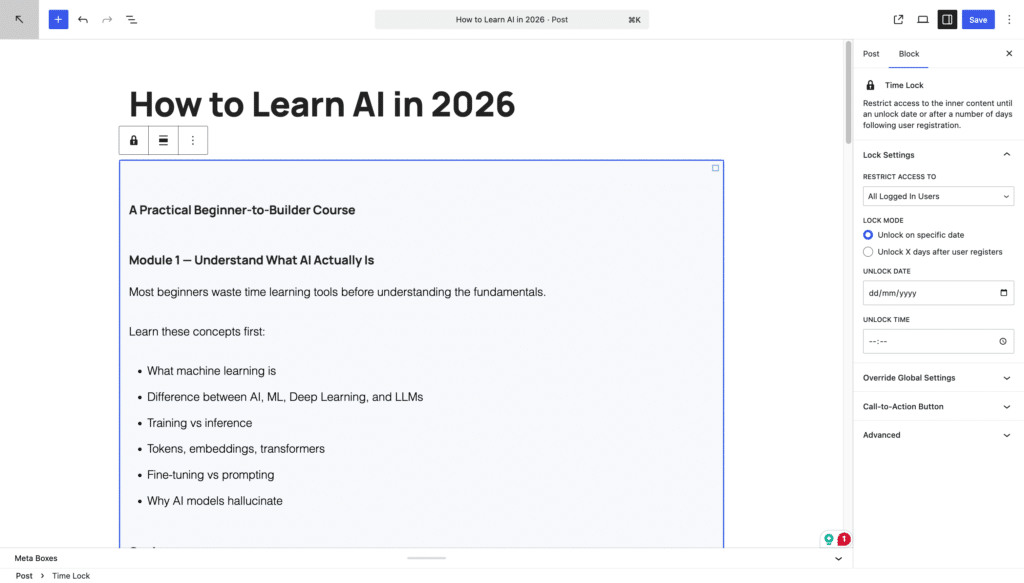
Timed Content Locker does exactly one thing: it locks the content of any WordPress post or page until a date you set. No LMS, no new user management system, no course builder to learn.
You get two unlock modes. Fixed date unlocking works for cohort courses — all students see the same calendar. Registration-relative unlocking works for evergreen courses — each student’s sequence starts from the day they registered, so someone who signs up in March gets the same paced experience as someone who signed up in January.
The locked screen shows your custom message and, if you turn it on, a countdown timer. You can add a call-to-action button to direct students somewhere useful while they wait. Administrators are always unlocked so you can preview freely.
Setup takes under 15 minutes. There’s nothing to configure beyond the plugin itself.
| LearnDash | Timed Content Locker | |
|---|---|---|
| Drip content by date | ✅ | ✅ |
| Drip by days after registration | ✅ | ✅ |
| Quizzes and certificates | ✅ | ❌ |
| Progress tracking per student | ✅ | ❌ |
| Prerequisite enforcement | ✅ | ❌ |
| Multi-course platform | ✅ | ❌ |
| Setup time | Days | 15 minutes |
| Annual cost | ~$200 | Free |
If your course needs quizzes, certificates, or per-student progress tracking, LearnDash is the right tool. Pay for it, learn it, use it.
If your course needs lessons to unlock on a schedule and nothing else, you don’t need LearnDash. You need a time lock. Install Timed Content Locker, spend 15 minutes on setup, and put the $200 toward something that actually moves your course forward.