
 USE CASES
Open the customer folder in your inbox and read a month of it properly. Not skim — read it, and put each message in a bucket.
Almost every store that does this finds the same four categories, in roughly the same proportions, and finds that the residue of genuinely unique questions is much smaller than it feels.
Then a fifth bucket for everything else: pre-purchase questions, product advice, complaints that are actually about the product, and the genuinely strange ones. That bucket is the work only you can do. The other four are, to varying degrees, a form.
“Where is it” is almost always the biggest bucket by count. That is why it gets all the attention in software marketing, and it is a misleading way to prioritise.
Cancellation is the most urgent bucket, by a wide margin.
Consider the clock on each. A WISMO email answered six hours late produces a slightly annoyed customer. A cancellation email answered six hours late produces an order that has already shipped, a customer who explicitly asked you not to ship it, and a conversation that is now about a refund and a return rather than a cancellation. Answered a day late, it produces a chargeback — and a chargeback costs you the fee, the goods, and a mark on your merchant account.
Cancellation requests are also the only bucket with a hard deadline set by your own operations. Every hour that passes moves the order closer to being picked. The others can wait; this one cannot.
So: count by volume, prioritise by urgency, and be aware that those give you different answers.
| Bucket | Self-service? | What it needs |
|---|---|---|
| Where is it | Mostly | Stages, dates, a delivery estimate, tracking if you have it |
| Cancel it | Partly | A request form and a queue. The decision stays yours |
| Return it | Partly | A form with items and reasons. The decision stays yours |
| Invoice | Fully | A link on the order page |
Invoice is the easy win and the one most often left undone. There is no judgement involved: the customer wants a document that already exists, or a printable version of an order they already placed. It should be a link, not a conversation. If you run an invoice plugin, the link is to its output; if you do not, WooCommerce’s own printable order page is a reasonable answer.
Cancellation and returns are only partly self-servable, and it is important not to overpromise here. What self-service removes is the collection — the back-and-forth to find out which order, which items, and why. What remains is the decision, which is a judgement call and should stay one.
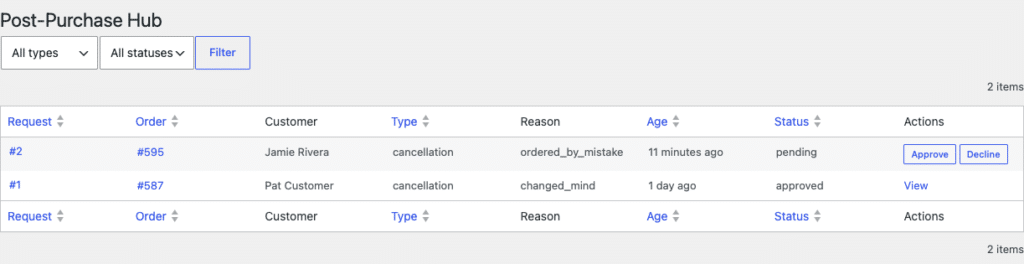
Replacing an email with a form only helps if the form arrives with everything you need. Otherwise you have replaced one round trip with a slightly prettier round trip.
The test is simple: can you act on the submission without replying to ask a question? That means it must carry, without the customer typing any of it:
The first three are the ones that matter, and they are the ones a generic contact form cannot supply. A form reached from an order already knows all of it. A form reached from a Contact page knows none of it, which is why “please include your order number” appears at the top of every contact page and why customers routinely do not.
Worth spending two paragraphs on because it is the smallest bucket and the fastest to eliminate entirely.
There is no judgement in an invoice request. The customer wants a document for an order they already placed and paid for. If you run an invoice plugin, the document already exists and the only thing missing is a link to it from the order page. If you do not, WooCommerce’s own printable order view is a reasonable answer for most customers — it is not a compliant invoice everywhere, but it covers the majority who just need a record for expenses.
The thing not to do is generate PDFs yourself because it looks like a small job. Legally compliant invoicing is jurisdiction-specific — sequential numbering rules, tax fields, credit notes — and it is a whole product. Link to something that already handles it, or link to the print view and say so plainly.
You do not need a month, and you do not need software. Here is the whole exercise.
That last count is usually the eye-opener. A large share of support time is not answering questions; it is establishing which order the customer is talking about. Any form that captures the order context up front removes that entire round trip, before it has changed a single policy.
Two things, and the second is the one people do not anticipate.
Volume drops. Fewer messages arrive, particularly the routine ones. Straightforward.
The shape of the remaining work changes, and it gets harder. What is left is the exception cases: the parcel that vanished, the return that is outside the window, the customer who is angry rather than confused. Your average handling time goes up, because the easy ones are gone.
This is worth knowing in advance, because it looks like a regression on a dashboard. Total time falls; time per contact rises. Both are the intended outcome. What you have done is stop spending your attention on the emails that a page could have answered.
The other change is a quieter one. When a customer can raise a cancellation request at 11pm and get an immediate acknowledgement with a response time on it, the tone of the follow-up is different from the tone of an email into silence. You are answering the same question — but not to someone who has spent six hours wondering whether anyone read it.
One week of labels tells you which of the four is your problem. It may not be the one you expected, and it is quite often not the one the software you are being sold is designed for. Putting a number on the WISMO bucket specifically is the companion exercise if that one turns out to be the big one.