
 TUTORIAL
“Delivery: 5–10 business days” is not information. It is a range wide enough that the customer cannot plan around it, cannot tell whether their order is late, and therefore has to ask you.
“Arrives between Tuesday 26 and Thursday 28 August” is information. It is buildable from data you already have, without integrating a single carrier API.
A customer with a date range knows two things: roughly when to be in, and when to start worrying. A customer with “5–10 business days” knows neither, because working out day ten from a Friday-evening order requires them to do calendar arithmetic on your behalf.
So on day four they email to ask. Not because anything is wrong, but because there is no way for them to tell whether anything is wrong. That is the entire mechanism, and it is why a date does more for your support volume than a faster courier would.
An estimate needs two numbers, and you know both without asking anyone.
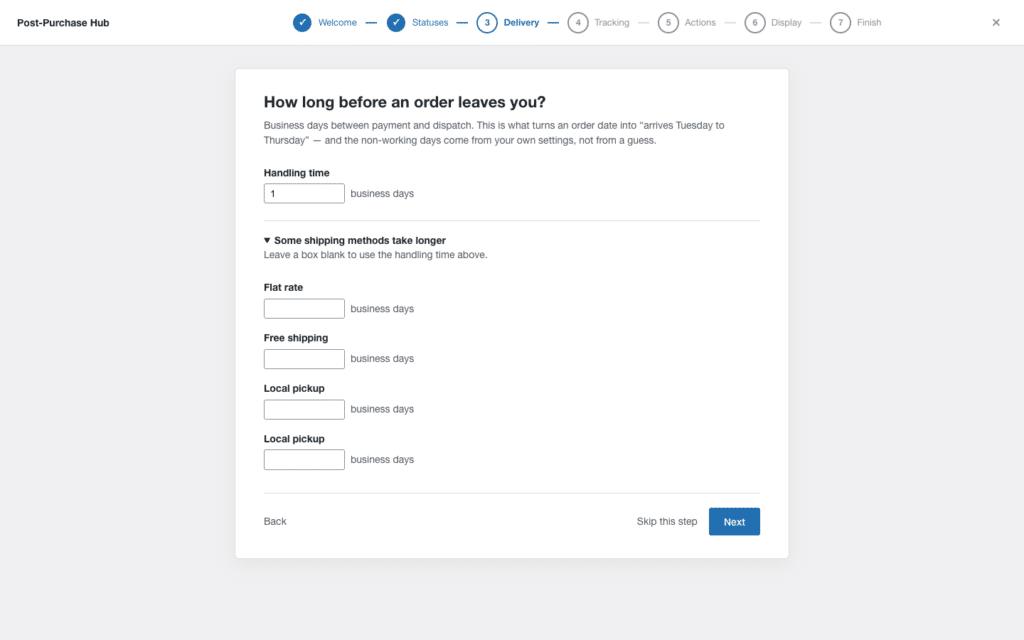
Handling time. Business days between an order being paid for and it leaving your building. You know this because you live it. Do not idealise it — if same-day dispatch means “usually, unless it is after 2pm or the weekend”, handling time is one day, not zero.
Transit time per shipping method. Your courier publishes this, and your own past deliveries confirm or contradict it. It is a range, not a number: two to four days for a standard service, four to seven for an economy one.
Add them and you have an estimate: paid date, plus handling, plus transit, expressed as a range.
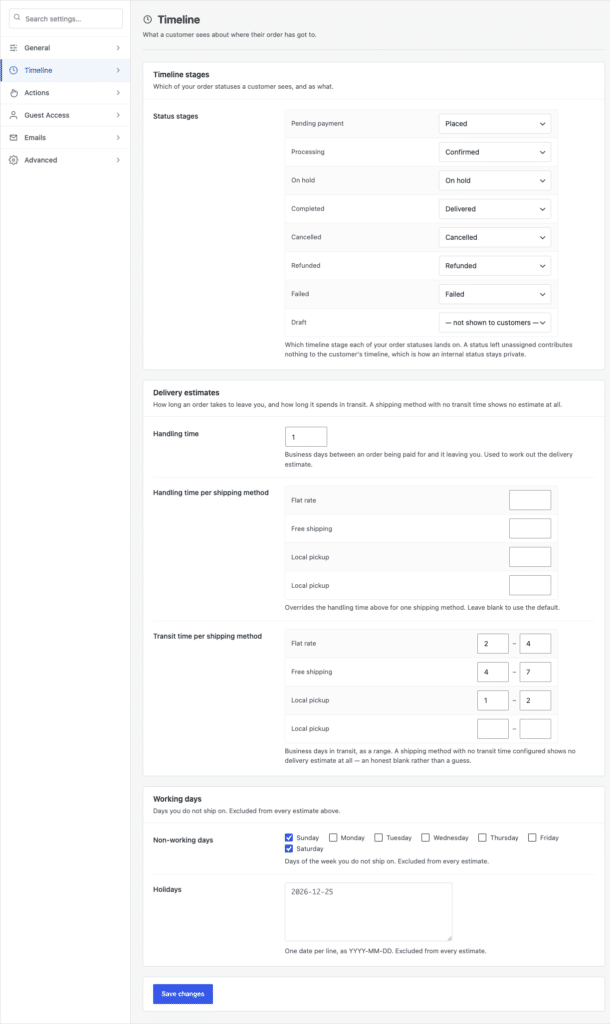
The per-method part matters more than it looks. A store with flat rate, free shipping and local pickup has three genuinely different answers, and a single store-wide estimate will be wrong for at least two of them. Free shipping is usually the slow service — if it shares an estimate with your paid one, the customers who paid the least will be the ones emailing you.
“Add three business days” looks like a one-liner. It is not, and every one of these has produced a wrong date on a real store.
PHP’s time() is UTC. Your shop’s cut-off is in the shop’s timezone. An order placed at 8pm on Friday in Sydney is Friday morning in UTC, and an estimate calculated in the wrong zone starts counting from the wrong day.
Use WordPress’s own helpers rather than raw PHP dates. wp_timezone() gives you the site’s DateTimeZone, and wp_date() formats in it. Anything derived from date() without a timezone is a bug waiting for a customer in another hemisphere.
Adding 86400 seconds is not adding a day. Twice a year it adds twenty-three or twenty-five hours, and an estimate that lands at 11pm quietly rolls into the previous or next date. Use DateTimeImmutable with modify( '+1 day' ), which understands calendars; do not do arithmetic on Unix timestamps.
Weekends are the easy part. The rest is local: public holidays in your country, the week you close between Christmas and New Year, the Saturday you do actually ship because of a sale.
There is no library that knows your calendar. A plain list of dates you maintain twice a year is the honest solution, and it beats any clever heuristic.
An order paid at 6pm on Friday does not get handled on Friday. If your calculation starts counting from the payment date without a cut-off time, every weekend order is a day or two optimistic — and weekend orders are a large share of a consumer store’s volume.
Set a cut-off. Orders after it start counting from the next working day. This single rule fixes the majority of wrong estimates.
A single date is a promise. A range is an expectation, and an expectation is what you can actually keep.
The failure mode of false precision is specific and expensive: “Arrives Tuesday 26 August” creates a customer who contacts you on Tuesday evening. “Arrives between Tuesday 26 and Thursday 28 August” creates a customer who contacts you on Friday, if at all. Same underlying data, a fraction of the email.
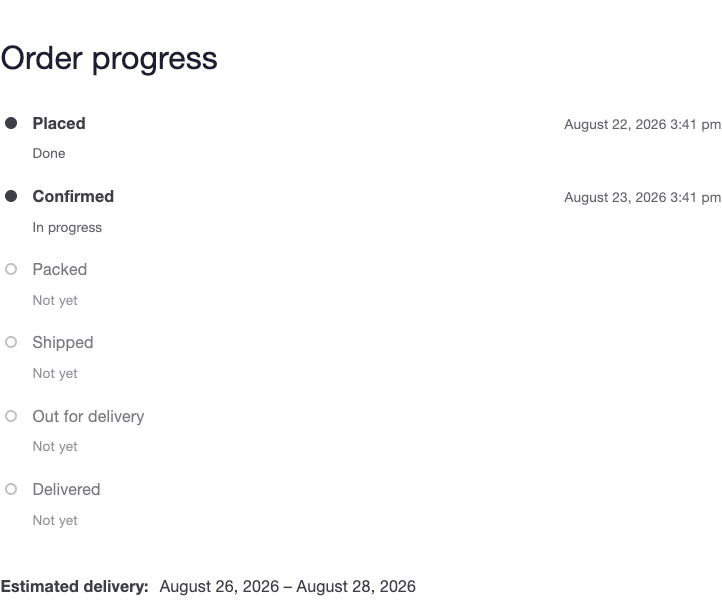
Keep the range honest. If your real spread is two days, show two. Widening a range to protect yourself teaches customers the estimate is padded, and once they believe that they go back to emailing.
The moment a real tracking number exists, your estimate is the second-best information on the page and should get out of the way.
Showing both is worse than showing either. The customer sees your estimate saying Thursday and the courier saying Wednesday, and now they have a question they did not have before. Suppress the estimate as soon as tracking data is available for the order — from whichever plugin holds it — and let the carrier’s information stand alone.
This is also the honest framing of what an estimate is for. It is what you show until you have something better. If you already run a tracking plugin, the two are complementary rather than competing.
Three places, in order of how much they earn their keep.
Start with the first two. They are where the support email comes from.
Some methods have no meaningful transit time. Local pickup is not delivered. A made-to-order item has a lead time your production queue decides. A pre-order has a date you already published elsewhere.
For those, show nothing. A blank is honest; a fabricated range is a promise you did not mean to make. Any system that forces a number onto every order will eventually put a delivery date on a pickup order, and somebody will wait at home for it.
This is an estimate, and it stays an estimate. It does not know that a depot is closed, that a parcel is sitting in a customs queue, or that a storm has stopped deliveries in one region. Those are exactly the cases where a customer most wants to know, and exactly the cases an estimate cannot cover.
What it does is remove the routine questions — the ones where nothing is wrong and the customer just cannot tell. That is most of them, and it is the share you can address without integrating a carrier. The rest needs real tracking data, and that is a different piece of work with a different dependency. Sizing which share of your own email is which is worth doing before you decide how much further to go.