
 USE CASES
A customer arrives at your order history page. They are logged in, they have bought from you before, and they are looking at a list of things they chose and paid for.
On a store selling consumables, that is the highest-intent page on the site. Higher than a category page, higher than search. And almost every store treats it as an archive.
Let us be specific, because this post is wrong for a lot of stores.
It applies if your products get used up: coffee, tea, supplements, pet food, skincare, filters, ink, cleaning products, brewing ingredients, hobby consumables. The signal is a repeat-purchase rate above roughly a quarter of customers and a reorder interval you could describe in weeks.
It does not apply if you sell things people buy once — furniture, jewellery, tools, instruments, most clothing at higher price points. On those stores the order page is genuinely an archive, and the right investment is in reducing support contact rather than driving repeat sales from it.
Check before you build. WooCommerce Analytics will tell you what share of customers have more than one order and how far apart those orders are. If the answer is 8% and eleven months, stop reading and go do something else.
The customer has already decided. They ran out of the thing. The only question is how many steps stand between that thought and a completed checkout.
Count them on your own store, honestly, from a logged-in phone:
| Route | Steps |
|---|---|
| Search the catalogue, find the product, pick the variation, add, checkout | 6–8 |
| My Account, Orders, find the order, open it, add each item, checkout | 5–7 |
| Orders list, Buy these again, checkout | 3 |
The middle row is what most stores actually offer, and it is barely better than the catalogue route. The gap that matters is between five and three, and it is entirely about whether the reorder control is on the list or hidden inside each order.
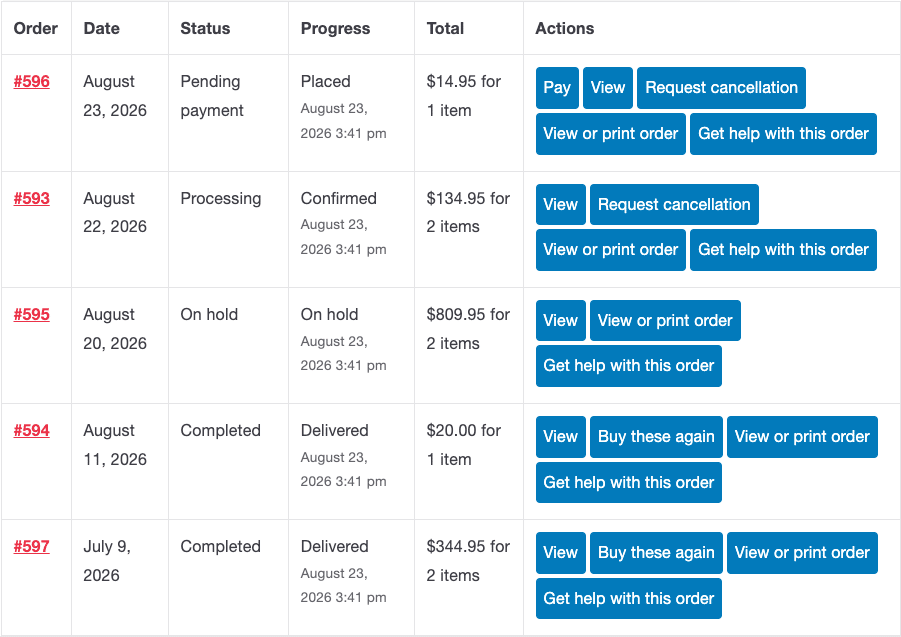
Note also which orders show it. Core exposes reorder on completed orders only. If your store leaves orders on processing, your customers have never seen the button at all — widening that is a one-filter change.
Nothing kills a reorder like a silent surprise, and reorder is unusually prone to them because it replays a snapshot of a catalogue that has moved on.
Four things change between orders: a product is discontinued, a variation is removed, stock runs out, or the price goes up. WooCommerce’s own reorder skips what it cannot add and prints a count — “2 items from your previous order are currently unavailable” — without saying which two or why, and says nothing at all about price changes.
For a repeat customer, that is the worst possible failure. This is somebody who buys the same thing on a cycle and is not reading the cart carefully, because they have done this before and it has always been the same. They will find out at the confirmation email, or worse, when the wrong thing arrives.

Show what changed before you touch the cart. It adds one screen and removes the entire category of “why is this different from last time” email.
Do not empty the cart. Core’s reorder clears the cart by default, via the woocommerce_empty_cart_when_order_again filter. On a consumables store, a customer often wants their usual order plus the new thing they just added. Losing the new thing is a small betrayal with a large effect on whether they use the feature again.
Order the list usefully. Most recent first is the default and is right. But a customer who orders monthly has twelve near-identical rows, and telling them apart requires opening each one. Item names or thumbnails on the row solve this at a glance.
Make the email a route in. The “your order was delivered” email is a natural moment. A link back to that specific order — one that works for guests too — is a better reorder prompt than a marketing campaign, because it is timed by the customer’s own consumption rather than by your calendar.
Four numbers, before and after:
That last one is an unexpected benefit. Reorder attempts are a running report on which of your repeat lines you keep failing to keep in stock, weighted by actual demand from people trying to buy them.
This is a narrow post and deliberately so. If your average order value is high and your repeat rate is low, none of it applies — the order page will never be a revenue channel for you, and time spent making it one is time not spent on acquisition or on the support burden.
And even on the right kind of store, reorder is not a growth strategy. It removes friction for customers who were already going to buy again. That is worth real money on a consumables store, and it is not the same thing as making people buy more often. Subscriptions do that; a button does not.