
 TUTORIAL
Somebody orders the wrong size, or orders twice, or changes their mind ten minutes later. They cannot undo it themselves, so they email you. You read the email, open the order, change the status, refund the payment, and reply. Five minutes, several times a week, forever.
WooCommerce already solves part of this and almost nobody knows it. This guide covers what core gives you for free, why it stops exactly where it does, and how to handle the cancellations it will not touch.
Core ships a customer-facing cancel link. It appears on the My Account orders list, and it works without a plugin.
The logic lives in wc_get_account_orders_actions(). WooCommerce builds a Cancel action for every order, then removes it again unless the order’s status is in this list:
$statuses_for_cancel = apply_filters(
    'woocommerce_valid_order_statuses_for_cancel',
    array( 'pending', 'failed' ),
    $order
);
Pending and failed. That is the whole default. An order that has been paid for — status processing — has no cancel link, because the filter has already stripped it.
The link itself comes from WC_Order::get_cancel_order_url(), and it is worth looking at what it carries:
order_id — the order’s IDorder — the order key, the random string WooCommerce generates per orderwoocommerce-cancel_order nonceOn the receiving end, WC_Form_Handler::cancel_order() verifies the nonce, checks the cancel_order capability, re-checks the status against the same filter, and compares the submitted key against the stored one with hash_equals(). Only then does it call update_status( 'cancelled' ) with the note “Order cancelled by customer.”
There is a detail here that catches people out. The cancel_order capability is granted in wc-user-functions.php by comparing the current user ID against the order’s user ID. For a guest order both are 0, so anyone holding a valid cancel link for a guest order can use it. The order key is what stands between that link and a stranger, which is exactly why you should never treat an order key as a public identifier.
Under WooCommerce → Settings → Products → Inventory there is a field called Hold stock (minutes). Set it, and WooCommerce schedules a woocommerce_cancel_unpaid_orders event that cancels pending orders older than that window and releases their stock.
This is not customer self-service, but it removes a whole category of “I never completed that order, please delete it” emails. If you have never set it, set it before you install anything.
It is tempting to widen the filter and be done:
add_filter(
    'woocommerce_valid_order_statuses_for_cancel',
    function ( $statuses, $order ) {
        $statuses[] = 'processing';
        return $statuses;
    },
    10,
    2
);
Three lines, and now customers can cancel paid orders. Do not ship this. Here is what happens the first time somebody uses it.
A processing order has been paid. Setting it to cancelled changes a status; it does not return anyone’s money. You now have a cancelled order with a captured payment, a customer who believes they have been refunded, and a gap between the two that grows until somebody notices.
WooCommerce hooks wc_maybe_increase_stock_levels() to woocommerce_order_status_cancelled. If the order reduced stock, cancelling puts it back. That is correct for an order sitting in a queue and wrong for one that has been picked, packed and handed to a courier — the item is in a van, not on your shelf, and your stock count now says otherwise.
Between “processing” and “shipped” there is a person with a picking list. WooCommerce has no idea where in that process the order is. A customer clicking Cancel at the wrong minute produces a parcel in transit against a cancelled order.
This is the decision the rest of the setup hangs on, so make it deliberately.
The objection to requests is fair: friction annoys people, and a request that sits unanswered for a day is worse than no button at all. The answer is a response-time promise you can actually keep, shown to the customer at the moment they ask. There is a longer argument for this in why cancellation requests beat instant cancellation, including the cases where the argument fails.
The wording matters as much as the mechanism. A button labelled “Cancel order” reads as done. Label it Request cancellation, and say in the dialogue itself that this is a request.
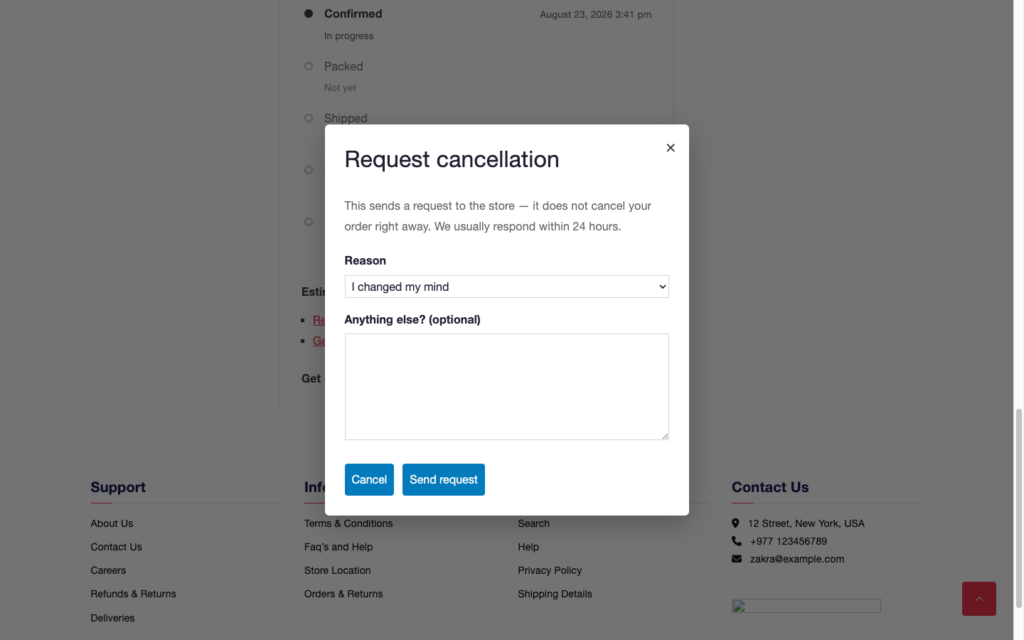
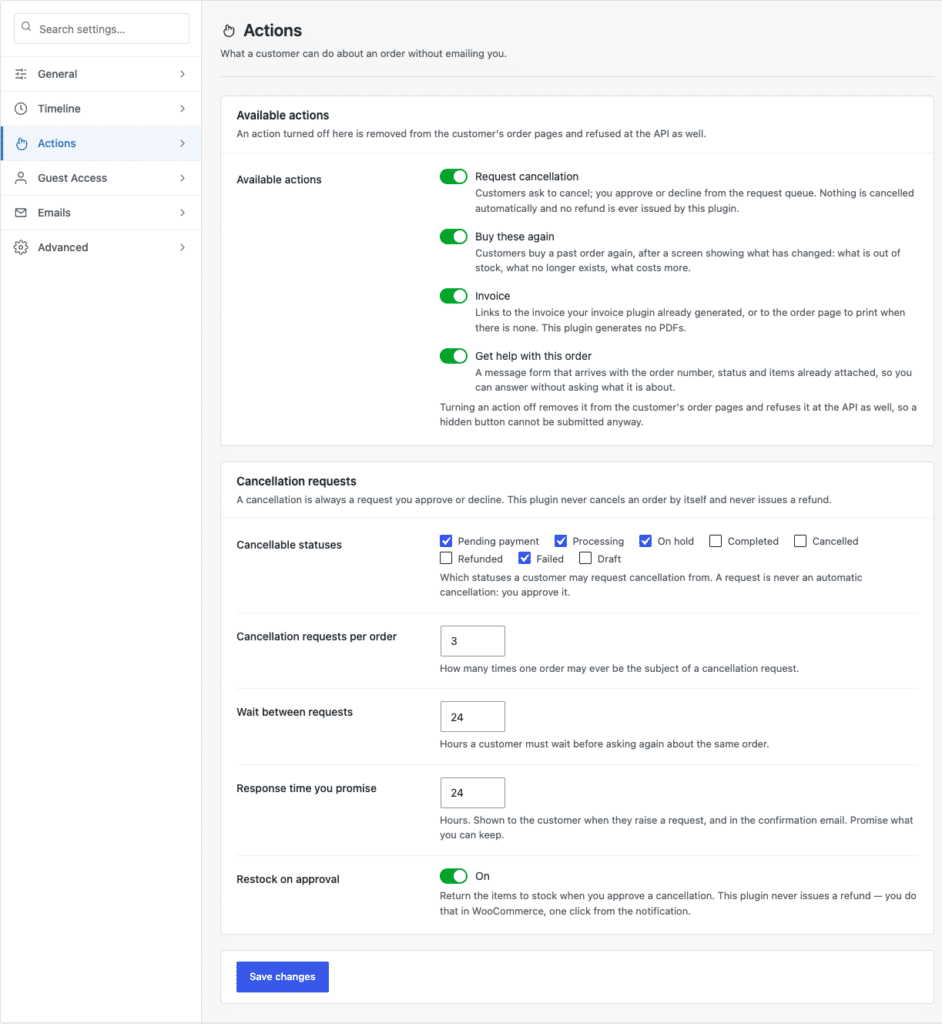
Four settings decide whether this feature helps you or generates a second inbox.
Start with pending payment, processing, on hold and failed. Leave completed off — a completed order is a delivered order, and what the customer wants there is a return, not a cancellation. Conflating the two is the single most common configuration mistake.
If you dispatch same-day, a cancellation request that arrives on day three is a return request wearing a hat. Set the window to something slightly shorter than your real dispatch time, so that requests you can still act on are the only ones you receive.
Some payment methods make cancellation expensive or awkward — bank transfer where you have to send money back by hand, buy-now-pay-later where a contract exists between the customer and a third party, cash on delivery where nothing has been captured at all. Exclude the ones where “cancelled” does not mean what the customer thinks it means.
Limit how many times one order can be the subject of a request, and how long a customer waits before asking again. Without these, a frustrated customer sends six requests in ten minutes and you triage the same order six times.
Restocking should be a decision you make at approval time, not an automatic consequence.
Approve a cancellation for an order still sitting in the queue, and restocking is right. Approve one for an order that was picked an hour ago and is on a bench waiting to be unpacked, and restocking is right only once somebody has actually unpacked it. Approve one for a parcel already collected, and restocking is simply wrong.
Keep restock on by default if you dispatch slowly, and off if you dispatch fast. Either way it should be a toggle you can see, not a side effect you discover during a stock count.
Automatic gateway refunds on cancellation sound like the obvious finishing touch. They are the feature most likely to cost you money.
Consider what an automated refund has to get right: partial captures, authorisations that were never captured, gateway fees that are not returned, currency conversion between capture and refund, orders split across two payment methods, and gateways whose refund API fails silently. Every one of those is a real configuration on a real store, and the failure mode is a customer publicly quoting a number you got wrong.
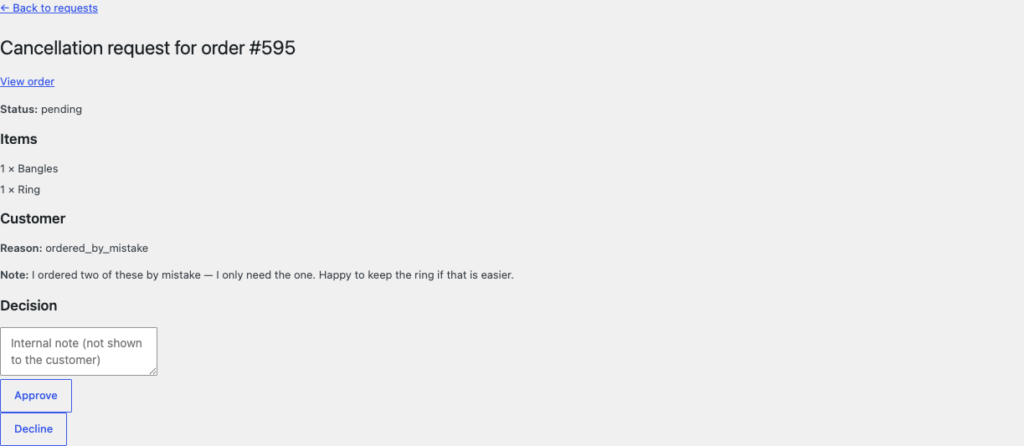
The safe design is the boring one: approving a cancellation changes the order status, optionally restocks, writes an order note and emails both parties. The refund stays where WooCommerce already put it — one click away on the order screen, where you can see the amount before you agree to it. If a plugin offers you automatic gateway refunds, treat it as a liability to switch off rather than a feature to enable.
A request that lands in your email inbox has not been moved out of your email inbox. The point of the whole exercise is one list, sorted by age, showing what is waiting on you.
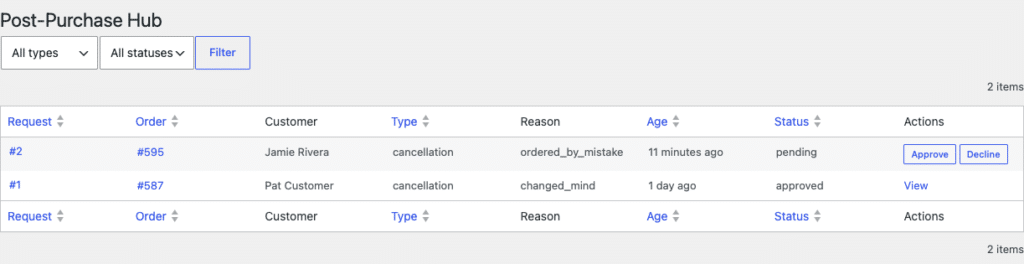
Two things make a queue usable rather than decorative. First, a count somewhere you already look — a bubble on the menu — so that nobody has to remember to check. Second, the request visible from the order screen as well, so that a colleague opening the order sees that a cancellation is pending before they pack it.
If you want to widen core’s cancel link rather than build a request flow, do it narrowly. This version allows cancellation of processing orders only within an hour of payment, and only for one shipping method:
add_filter(
    'woocommerce_valid_order_statuses_for_cancel',
    function ( $statuses, $order ) {
        if ( ! $order instanceof WC_Order ) {
            return $statuses;
        }

        $paid = $order->get_date_paid();

        if ( ! $paid || ( time() - $paid->getTimestamp() ) > HOUR_IN_SECONDS ) {
            return $statuses;
        }

        foreach ( $order->get_shipping_methods() as $method ) {
            if ( 'local_pickup' === $method->get_method_id() ) {
                $statuses[] = 'processing';
                break;
            }
        }

        return $statuses;
    },
    10,
    2
);
Two things to note. The filter runs in both wc_get_account_orders_actions() and WC_Form_Handler::cancel_order(), so widening it widens the button and the handler together — you are not relying on the button being hidden. And the refund is still yours to issue: core’s handler sets the status and nothing else.
If you are adding your own buttons rather than reusing core’s, the developer guide to My Account order actions covers the nonce and capability handling that goes with them.
Self-service cancellation removes a recurring email. It does not remove the decision — somebody still has to look at each request and decide, and on a busy day that is still work. What changes is that the work is a queue with an age column instead of an inbox thread, and that the customer got an immediate, honest answer about when they would hear back.
It also does nothing for orders that have already arrived. That is a returns problem, and it needs a different workflow with different rules. If you are comparing plugins for this, the criteria worth evaluating them on are mostly not the ones on the feature lists.