
 PLUGIN COMPARISON
Cancellation plugins are cheap, similar-looking, and mostly reviewed on the wrong criteria. Feature lists count statuses and toggles. The things that decide whether one works on your store are elsewhere.
So: criteria first, field second, and a recommendation per store profile rather than a winner.
WooCommerce already cancels unpaid orders. The cancel link on the My Account orders list is limited to pending and failed by the woocommerce_valid_order_statuses_for_cancel filter, and the Hold Stock setting under Products → Inventory auto-cancels stale unpaid orders and releases their stock.
If your cancellation email is mostly about unpaid orders, configure those two things and buy nothing. The full picture of what core does is worth reading before you shop, because it is more than most people expect.
Can you allow cancellation from processing and on-hold, and can you exclude completed? Some plugins offer an all-or-nothing switch, which means either no coverage of paid orders or a cancel button on delivered ones.
Check custom statuses too. If a fulfilment plugin adds awaiting-shipment, does the cancellation plugin see it or does it hardcode core’s list?
Hours or days from order, and — better — from payment, which is what actually matters on a store with bank transfer. A plugin with only a whole-day granularity is no use if your dispatch cut-off is 2pm.
Frequently missing and frequently needed. Bank transfer, cash on delivery and buy-now-pay-later each make “cancelled” mean something different. Without per-method exclusions, one policy has to cover all of them and it will be wrong for at least one.
The one that matters most. See below.
Instant cancellation, or a request you approve? And if requests: is there a real queue with filters and an age column, or does it email you and call that a workflow? The case for requests over instant cancellation matters here, but so does the mechanics — a request system without a usable queue has moved your inbox, not replaced it.
WooCommerce restores stock automatically on cancelled, via wc_maybe_increase_stock_levels(). Can the plugin suppress that? For a store where cancellation often happens after picking, automatic restock puts your inventory out of step with your shelves.
If you allow guest checkout, a cancellation feature that only works inside My Account covers a fraction of your customers. Ask how a guest authenticates — a signed link is the right answer, an order number in a URL is not. The guest gap is easy to overlook when evaluating on a test store where you are always logged in.
Check the plugin declares custom_order_tables compatibility — WooCommerce will warn you on the plugins screen if it does not. A plugin reading order data through get_post_meta() on an HPOS store fails silently rather than loudly, which is the worst kind of failure.
Hooks or template replacement. A plugin that ships its own myaccount/orders.php will fight your theme and any other plugin on that page. Ask, or look in the plugin’s templates/ directory before buying.
Four groups, and knowing which group a plugin is in tells you most of what you need.
WooCommerce’s own Customer Order Cancellation extension. First-party, which means it will track core changes and it will not do anything surprising. Buy this if you value that above everything else, and check its rules against your list above rather than assuming first-party means comprehensive.
Thin single-purpose plugins, mostly free or very cheap, on WP.org and CodeCanyon. These typically widen the status filter and add a settings page. They do that job. Read the code — for many of them it is a few hundred lines, and you will learn more in ten minutes than from any review.
Cancellation-plus-returns plugins. Several RMA products include cancellation. Sensible if you need both; overkill and an unnecessary settings surface if you only need one. The returns comparison covers that group properly.
Post-purchase suites, ours included, where cancellation is one action among several sharing a request queue. Right when cancellation is not your only problem, wrong when it is.
Install it on staging with a copy of your real orders and run these five, in this order. Most plugins fail one of them and you will know which within twenty minutes.
Tests three and four are the ones nobody runs, and they are the ones where a cheap plugin most often gets it wrong. A cancellation endpoint is a state-changing action on somebody else’s order; it is the highest-value target in the plugin.
An order note on every action. When a customer says “I cancelled that last Tuesday” and your records disagree, an order note with a timestamp settles it in ten seconds. A plugin that changes an order’s status without writing a note has removed your audit trail in exchange for a tidier order screen.
Emails that inherit your WooCommerce template. If the plugin’s notifications are WC_Email subclasses, they pick up your header, colours and footer automatically and appear in WooCommerce → Settings → Emails like everything else. If they are not, you get a plain email that does not look like your store’s, and no way to edit it without touching code.
What happens to the refund.
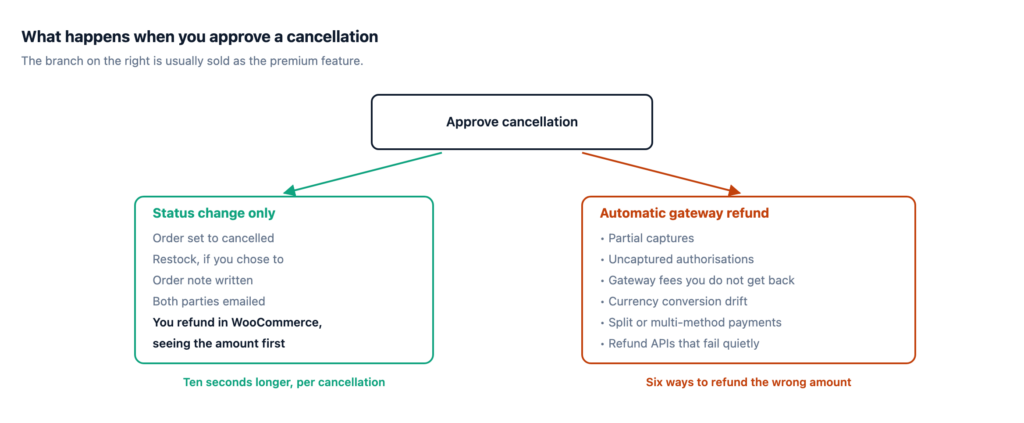
Automatic gateway refunds are usually presented as the premium feature — the plugin cancels the order and returns the money in one step. Treat that as a risk to evaluate rather than a benefit to pay for.
What an automated refund has to get right, on your store, without supervision:
Every one of those is a normal configuration on a normal store. When it goes wrong the failure is a customer who was refunded the wrong amount, and that is a public review with a currency figure in it.
The safer design is a status change, an optional restock, an order note, and a link to WooCommerce’s own refund screen where a human can see the amount before agreeing to it. It takes ten seconds longer per cancellation and removes an entire class of expensive mistake.
If a plugin does offer automatic refunds, the question is whether you can turn it off, and whether off is the default.
| Profile | What to do |
|---|---|
| Cancellations are mostly unpaid orders | Configure core. Buy nothing. |
| A few paid cancellations a month, you dispatch slowly | A thin plugin, or a filter snippet. Keep refunds manual. |
| Same-day dispatch, cancellation is time-critical | Request-and-approve with a queue and notifications. The queue is the product. |
| Significant guest checkout | Whatever you choose must handle guests with signed links. This eliminates most of the field. |
| Cancellations and returns both | An RMA plugin covering both, or a suite. Not two separate plugins with two queues. |
| Agency, many client stores | Whichever uses hooks rather than template overrides. That criterion outranks features across a portfolio. |
Two rows there end in “buy nothing” or “buy something that is not us”, and both are common. The single most useful thing you can do before shopping is to read a month of your own cancellation emails and count how many were for orders that had actually been paid for.