
 PLUGIN COMPARISON
Returns plugins are unusual in that the feature lists genuinely do not tell you which one to buy. They all have request forms, reason codes, statuses and emails. Stores still end up abandoning them, and the reason is almost always fit with how the warehouse actually works rather than a missing feature.
Do you need exchanges?
This one question splits the market in two, and the two halves have different products at different prices.
No. A return is goods back and money back. Your options are numerous and inexpensive, including free ones that do the job.
Yes. An exchange is a return, plus a replacement order, plus a price-difference reconciliation in either direction, plus a decision about whether to reserve the replacement stock while the return is in transit. Your options narrow sharply and cost considerably more, and the ones that claim exchanges vary enormously in how completely they mean it.
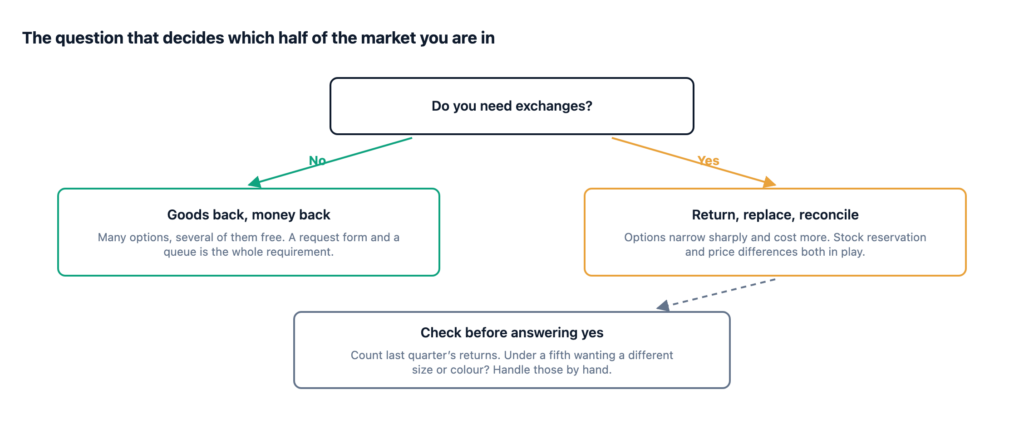
Before answering yes, check your own data. Count how many of last quarter’s returns were a customer wanting a different size or colour rather than their money back. If it is under a fifth, handle those by hand as a refund plus a new order and buy from the cheaper half of the market. The design guide to a returns workflow covers why exchanges are worth deferring even when you eventually want them.
The most important structural question and the easiest to check on a demo. Customers return one of three shirts, not the order. A whole-order return form pushes every partial return back into email, which is what you were escaping.
Check quantities as well as items: they bought three, they are returning one.
Days from delivery, not from order. A store-wide window is a starting point; per-category is what you will want within a month, because electronics, clothing and perishables are not the same problem. Ask whether the window can be attached to product categories, and what happens to an order spanning two categories with different windows.
Editable list, or hardcoded? A fixed list you cannot change is a reporting dead end. And can a reason drive behaviour — “faulty” waiving return shipping, for instance — or is it just a label?
The decision must happen at receipt, once somebody has seen what came back. A plugin that restocks on approval is putting damaged goods back into your available stock, and you will find out when a customer buys one.
Instructions only, merchant-uploaded label, or generated label? Generated labels mean a carrier account and a per-country integration, and they are where the price jumps. Instructions-only is a perfectly good starting point and works with any courier in any country.
Same warning as the cancellation comparison. Automatic gateway refunds on return approval are worse here than for cancellations, because approving a return means “yes, send it back to us” — the goods have not arrived and may never arrive. A plugin that refunds at approval rather than at receipt is a plugin that will pay for goods you never get.
Look for the refund to be a separate step, after receipt, with a human confirming the amount.
How many emails, at which points, and can you edit them? A returns process has at least four moments worth an email: received, approved or declined, goods arrived, refunded. Plugins that only email at the first two leave the customer wondering during the longest part of the process — the bit where their parcel is in transit and their money is not back.
Check whether they are WC_Email subclasses. If they are, they inherit your WooCommerce email template and customiser settings. If they are not, your returns emails will not look like the rest of your store’s.
Filterable by status and date, sortable by age, with the order one click away. Returns requests sit for longer than cancellations and the queue is where they get lost.
These are the ones that decide whether a returns plugin is still in use in six months. None of them appear on a feature comparison, and all of them are answerable by walking through one real return on staging.
How does a returned parcel get matched to its request? A box arrives with no covering note. Somebody has to work out which of eleven open returns it is. A plugin that issues a short reference number for the customer to write on the parcel has solved this; one that does not has handed the problem to your warehouse.
What happens to a request nobody actions? Returns sit longer than cancellations. Does the queue sort by age? Does anything chase? A request that quietly ages out is worse than no system, because the customer believes they are in a process.
Can two people work the queue without colliding? On a store with more than one person handling returns, an internal note field and a visible decision history are the difference between a queue and a shared inbox with extra steps.
Does a return show on the order screen? Somebody opening the order in wp-admin should see there is an open return against it, without going to look. Otherwise the second person to touch that order acts on stale information.
What does the customer see while waiting? The longest part of a return is the bit where the parcel is in transit and the money is not back. If nothing acknowledges that period, you will get an email during it, which defeats the point.
A returns plugin is also a reporting tool, and the report is where the long-term value is.
At minimum you want return rate by product, reason distribution overall, and reason distribution for your top few products. That is what tells you a size chart is wrong or a product photograph is flattering. Check that the reason data can be exported, or at least filtered, before you commit — a plugin that records reasons and gives you no way to aggregate them has collected data on your behalf and kept it.
Also check retention. Return records contain customer names, addresses and free-text notes. Ask what happens to them over time, and what the plugin does on uninstall — a plugin that leaves customer data in your database after removal is a problem you have inherited without being told.
Four groups.
WooCommerce’s own Returns and Warranty Requests extension. First-party, oriented around warranties as much as returns, which suits some catalogues better than others. The usual first-party advantages: it will track core, and it will not surprise you.
Established third-party RMA plugins on the WooCommerce marketplace and CodeCanyon. This is where most of the depth is — exchanges, label handling, store credit, warranty periods. Also where the widest quality range is. Evaluate on the criteria above and on how recently the plugin was updated against a current WooCommerce.
Free and low-cost plugins on WP.org. Usually request form plus admin list, no exchanges, no labels. Genuinely sufficient for a store doing a handful of returns a week, and the right starting point if you have never had a formal process.
Post-purchase suites. Returns as one action among several, sharing a queue with cancellations. Convenient when you need both. Shallower than a specialist, necessarily.
Post-Purchase Hub does not do returns in 1.0. Cancellation requests, timeline, delivery estimates, reorder, invoice access and contextual help — yes. Returns are on the roadmap and not in the box.
So if returns are your problem today, buy a returns plugin today. That is not a soft disclaimer at the end of a sales page; it is the actual recommendation, and installing us instead would leave you with the same problem plus a settings screen.
| Profile | What to buy |
|---|---|
| Under five returns a week, no exchanges | A free or low-cost request-form plugin. Manual shipping instructions. |
| Clothing, high return rate, exchanges are most of it | A specialist RMA plugin with real exchange support. This is your core workflow; pay for it. |
| Electronics with warranty periods | Something that models warranty length per product, which is a different feature from a return window. |
| Returns plus cancellations, moderate volume | One tool covering both, so there is one queue rather than two. |
| No process at all today | Anything with item-level requests and a queue. Getting returns out of email is the win; the plugin choice matters less than you think. |
One closing note that applies whichever you buy. A returns plugin does not reduce returns, and no plugin claims otherwise once you read carefully. It makes them cheaper to process and gives you a reason code on each one. That reason report is the thing that eventually reduces returns — it tells you which product page is misleading and which size chart is wrong — and it only works if the reason list is short enough that people pick honestly.