
 PLUGIN COMPARISON
Order tracking is one of the few WooCommerce categories where the free options are genuinely competitive with the paid ones, and where a lot of stores pay for something they already had.
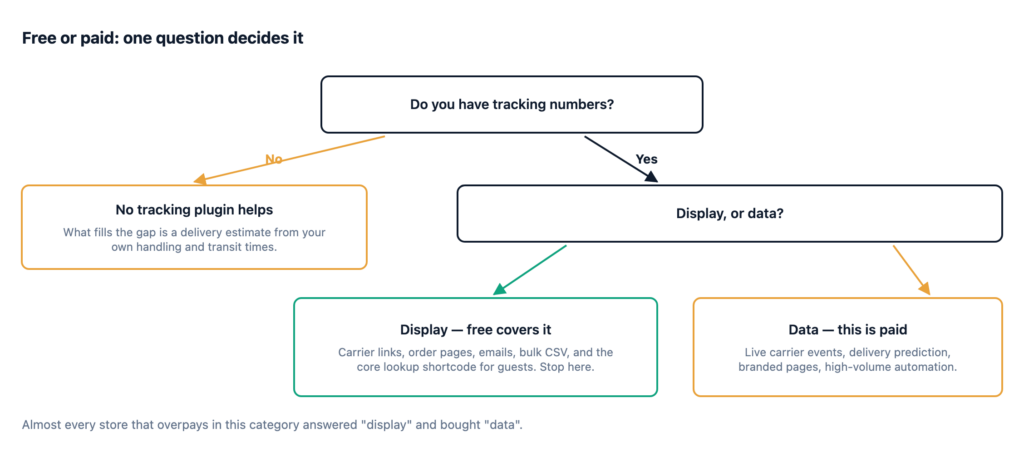
Here is the line, and a single question that tells you which side of it you are on.
More than the marketing for the paid tiers implies. A free tracking plugin such as Advanced Shipment Tracking gives you:
WooCommerce core adds two more things for free, and both get forgotten. The [woocommerce_order_tracking] shortcode gives guests an order-number-plus-email lookup — it is limited, but it is real and it is already installed. And core has an Order Fulfillments feature in development, present in recent versions but off by default and not yet exposed as a merchant-facing setting.
Put together, that is a complete answer to “the customer cannot see the tracking number”. If that is your problem, you are done, and you have spent nothing.
Do you need display, or data?
Display means showing information you already have — the tracking number your courier gave you, in a link the customer can click. This is solved for free. Comprehensively. There is no meaningful display capability behind a paywall that changes a customer’s experience.
Data means information your store does not have and has to fetch: where the parcel is right now, whether a delivery was attempted, whether it has cleared customs, a predicted arrival date from the carrier’s own model. Getting that requires talking to carriers, and talking to carriers is what you are paying for.
Almost every store that overpays in this category has answered “display” and bought “data”.
The real one. Instead of a link out to the courier’s site, the carrier pushes status changes into your store: picked up, in transit, out for delivery, delivery attempted, delivered. That turns your order page into something that updates itself, and it is the only way to know a delivery failed before the customer tells you.
This is genuinely worth paying for at volume, and it is genuinely impossible to do free, because somebody has to maintain integrations against hundreds of carriers who change their APIs without asking.
Distinct from an estimate based on your own handling and transit times. A carrier’s prediction accounts for the actual route and current network conditions. It is more accurate, particularly when something is going wrong — which is exactly when accuracy is worth most.
Keeping the customer on your domain rather than sending them to the courier’s site. Worth something if you are running post-purchase marketing on that page. Worth very little otherwise, and it is often the headline feature of a paid tier because it demos well.
Above a few hundred shipments a month, tracking numbers should arrive from your shipping software rather than being typed in. Free tiers often cap API volume or omit the integrations entirely, and at that scale the cap is the reason to upgrade rather than any feature.
Before upgrading, check that the problem is one money can solve.
Inconsistent data entry. If tracking numbers get added for most orders but not all, no tier fixes that. Customers learn quickly that your tracking is unreliable and go back to emailing, and the more prominent the display, the faster they learn it. This is a process problem with a process fix.
A courier with poor data. Carrier webhooks are only as good as the carrier. Some regional and economy services scan a parcel twice in a week. Paying for live events buys you the events that exist, and if your courier does not generate them, you have bought a faster route to the same silence.
The gap before dispatch. No tracking plugin at any price can display a tracking number that does not exist yet, and the handling window is when the wondering starts. That gap is filled by an estimate from your own numbers, not by a tracking upgrade.
A surprising number of “we need to upgrade” conversations end at one of those four.
| Capability | Free | Paid |
|---|---|---|
| Carrier list and tracking links | Yes | Yes |
| Display on order pages and emails | Yes | Yes |
| Bulk entry | Usually | Yes |
| Guest tracking lookup | Core shortcode | Better form, often CAPTCHA |
| Live carrier status events | No | Yes |
| Carrier delivery prediction | No | Yes |
| Branded tracking page | Rarely | Yes |
| High-volume API and automation | Capped | Yes |
The top four rows are where a customer’s experience is decided, and they are all covered for free.
Worth stating plainly, because a comparison written by a vendor should say which side of the line it is on.
Post-Purchase Hub is on neither side of the tracking line. We do not do tracking. No carrier integrations, no tracking numbers, no outbound requests to anyone. We read the tracking data your tracking plugin already stores and display it alongside the timeline, and when there is no tracking number we show a delivery estimate from your handling and transit times instead — which disappears the moment real tracking exists.
What we sell is the layer above: cancellation requests, reorder, invoice access and contextual help, with a merchant queue behind them. If your problem is tracking, we are not the answer, and the free option in that category is a good one.
Start free. Free covers display, and display is what most stores actually need. Pay when you need carrier data — live events, real predictions — or when your volume outgrows manual entry.
And before paying for anything in this category, check that tracking is the problem. A meaningful share of the stores shopping for tracking plugins are trying to solve “customers keep emailing me”, and a good proportion of that email is not about where the parcel is.