
 PLUGIN COMPARISON
People search for “Advanced Shipment Tracking alternative” and land on pages explaining why AST is not good enough. This is not one of those pages.
AST is a good plugin, it is free, and for a large share of the stores that search that phrase it is the correct answer on its own. Here is the honest version of where it sits relative to us.
Advanced Shipment Tracking is one of the most-installed shipping plugins for WooCommerce — 70,000+ active installations at the time of writing — and the install base reflects the fact that it covers its category properly.
That is a complete answer to “my customers cannot see where their parcel is”. It is also, notably, free.
Genuinely. This is the scenario where we are the wrong choice and AST is the right one, and it is not a small scenario — it is probably the majority of people who found this page.
You are the AST case if: you ship physical goods with real tracking numbers, your support email is mostly “where is it”, and your customers rarely ask to cancel, return or reorder. Install AST, enter tracking numbers consistently, and you are done. Adding our plugin on top would give you a settings screen you do not need.
Worth sizing that honestly first — counting a week of your own email by category takes an afternoon and will tell you whether tracking really is your whole problem.
Not as criticism — these are simply outside its category.
The pattern: AST tells the customer where the order is. It does not let them do anything about it. If your support email is largely “cancel this” rather than “where is this”, tracking is not the problem you have. Those two categories behave very differently — cancellation is smaller by volume and much more urgent.
One place: the timeline display. Both plugins can put a progress view on the order page, and running two of them means two progress views on one page, which is worse than either.
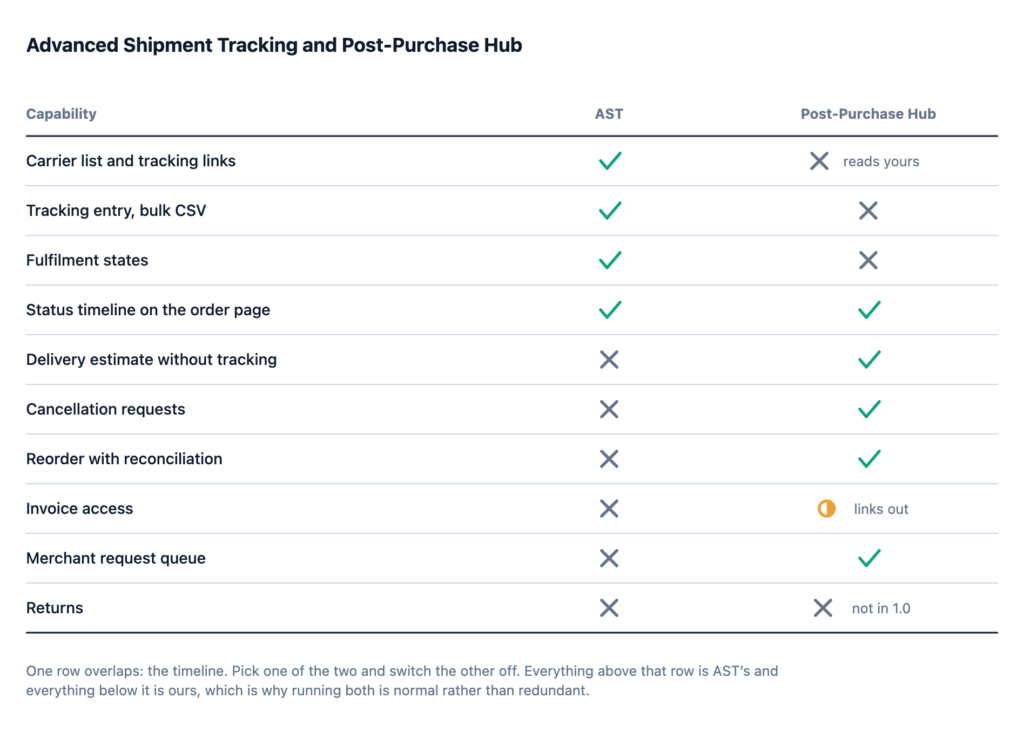
Two rows in that table are worth reading carefully, because they are the ones where we are not the answer. AST holds the entire tracking column, and neither plugin does returns.
Our position on tracking is not competitive, it is architectural: we read the tracking numbers your tracking plugin already stores, and we never fetch anything from a carrier.
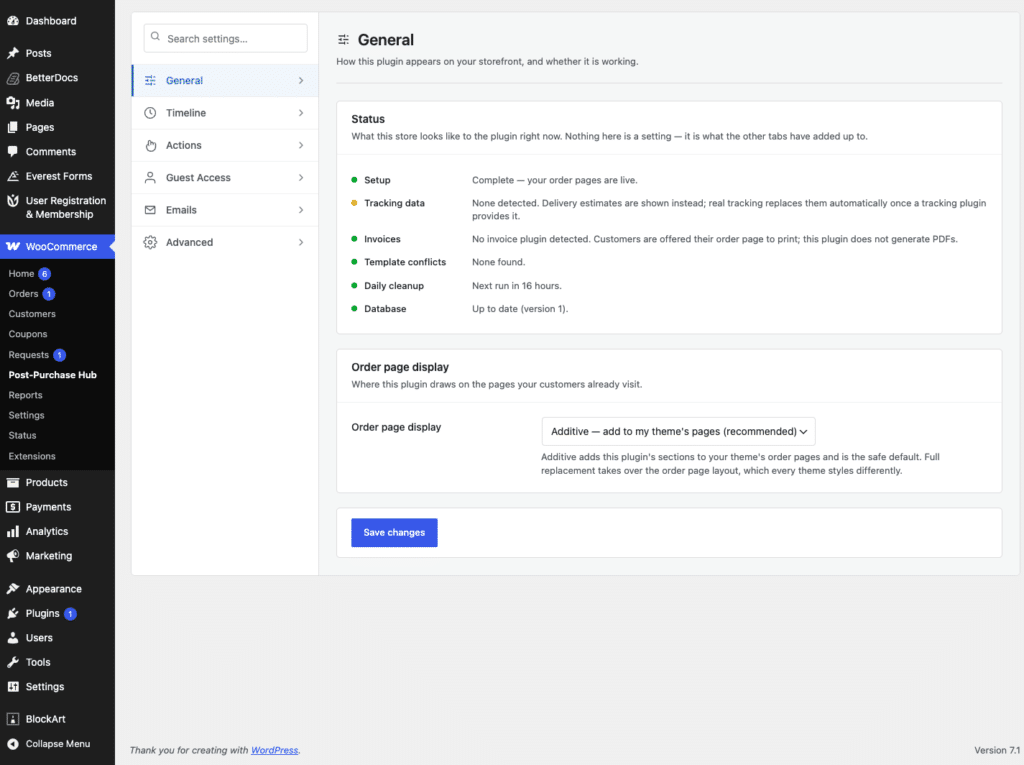
Concretely, that means:
On the duplicated timeline: pick one. If you run AST for tracking, either turn off its widget and use ours for the stages, or turn ours off and keep AST’s. There is no clever merge, and any plugin claiming otherwise is going to produce a strange page on somebody’s theme.
If you land on the “both” row, the setup is short and there are three decisions worth making deliberately rather than discovering.
Pick one timeline. Two progress widgets on one order page is the only genuine conflict between these plugins. Turn off whichever you like less. Neither plugin is harmed by the other’s display being disabled.
Enter tracking numbers in one place. AST, since that is where the carrier list and the bulk CSV import live. Nothing should ask you to type a tracking number twice; if it does, that is a misconfiguration rather than a workflow.
Check the order page on mobile afterwards. Two plugins adding sections to the same template is exactly the situation where a theme’s responsive account styling gives up. It is a five-minute check and it is the one people skip.
Worth isolating, because it is the one capability difference that changes a customer’s experience on a store that already runs a tracking plugin.
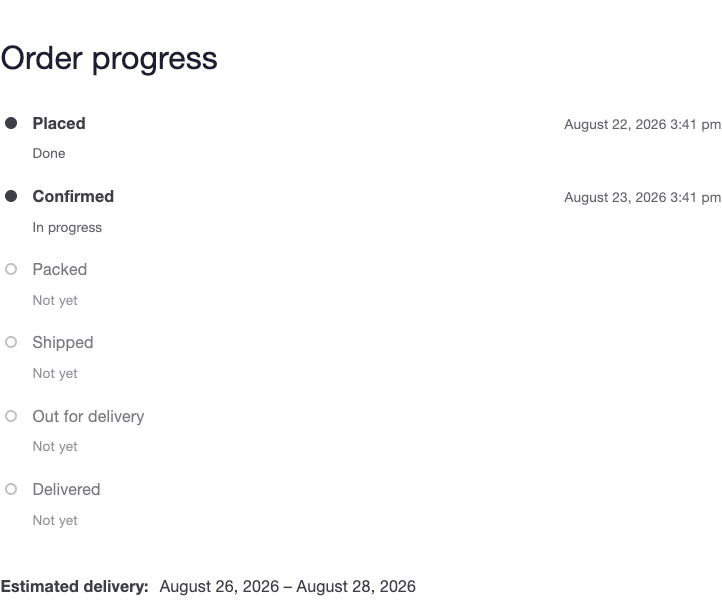
A tracking plugin can show nothing until a tracking number exists. On most stores that is one to three days after the order was placed — and those are precisely the days when a customer starts wondering. So the store with tracking set up perfectly still gets “where is my order” email during the handling window, because the page is empty during the handling window.
An estimate computed from your handling time and the shipping method’s transit range fills that gap and then gets out of the way. This is not a criticism of AST; a tracking plugin has no business inventing dates. It is just the seam between the two categories, and it happens to be where a chunk of the email comes from.
A fair question, given AST already has one.
Two reasons, and neither is “ours is better”. First, the action buttons need somewhere to live, and the order progress view is where a customer is already looking when they want to cancel something. Second, the delivery estimate for orders that have no tracking number yet — the window between paying and shipping, which is exactly when the “where is my order” emails start and exactly when a tracking plugin has nothing to show.
We sell the actions. The timeline is the container they sit in.
| Your situation | What to do |
|---|---|
| Tracking numbers exist, support email is “where is it” | AST alone |
| No tracking plugin, no tracking numbers | Us alone, for estimates and actions |
| Tracking is handled; the email is now “cancel it”, “invoice”, “return” | Both |
| Returns are the main problem | Neither — you need an RMA plugin |
| You want the account page redesigned | Neither — you want a design plugin |
Three of those five rows do not end with us, and that is not modesty. A store that installs a post-purchase action layer when what it actually needed was a tracking plugin ends up with a settings screen, no new capability, and a fair reason to leave a one-star review.
AST has been extending toward fulfilment workflow and customer-facing display for a while, and WooCommerce core has an Order Fulfillments feature in development — present in recent releases, off by default and not yet exposed as a merchant setting.
The tracking and display half of this category is getting more crowded, not less. That is a reason to be sceptical of anyone selling you a timeline as a differentiator, including us. The question worth asking of any plugin in this space is what it does that core and the free incumbents do not.