
 PLUGIN COMPARISON
Search for “WooCommerce my account page plugin” and the results are two entirely different kinds of product presented as if they compete. They do not. They solve different problems, and buying the wrong one is the most common purchasing mistake in this corner of the ecosystem.
Design plugins change how the account area looks: layout, navigation, tabs, endpoints, dashboard widgets, colours, icons, mobile behaviour.
Behaviour plugins change what the account area does: what a customer can accomplish there without emailing you.
A design plugin will not let a customer cancel an order. A behaviour plugin will not make your account page look designed. Neither is a substitute for the other, and quite a few stores need both.
The larger and more mature category. Roughly:
What they typically add: a navigation layout you control, custom endpoints and tabs, dashboard cards, styling that matches the rest of the site, and reordering or hiding of the default sections.
Smaller category, and it splits by which action it covers: cancellation, returns, tracking display, reorder, invoices — or a suite covering several, ours included.
What they add is capability: a request form that feeds a queue, a progress timeline with dates, a reorder flow that tells the customer what changed, a link to an invoice. None of it changes the layout of the page, and none of it will make a default account page look better.
And they should buy design. This is the honest read on the search term.
The trigger for the search is usually visual: somebody looked at their account page next to the rest of their carefully designed store and found a bare table with a heading. That is a real problem, it is worth fixing, and a behaviour plugin does nothing for it. A store owner who buys a cancellation plugin hoping the account page will look better has wasted their money and will fairly say so in a review.
The signal that you want behaviour instead is not aesthetic, it is your inbox. If the same four emails keep arriving — where is it, cancel it, return it, invoice — that is a behaviour problem, and no amount of layout work will reduce it. The four-bucket audit takes a week and answers this definitively.
Abstractly the split is easy to state and easy to forget mid-purchase. Concretely:
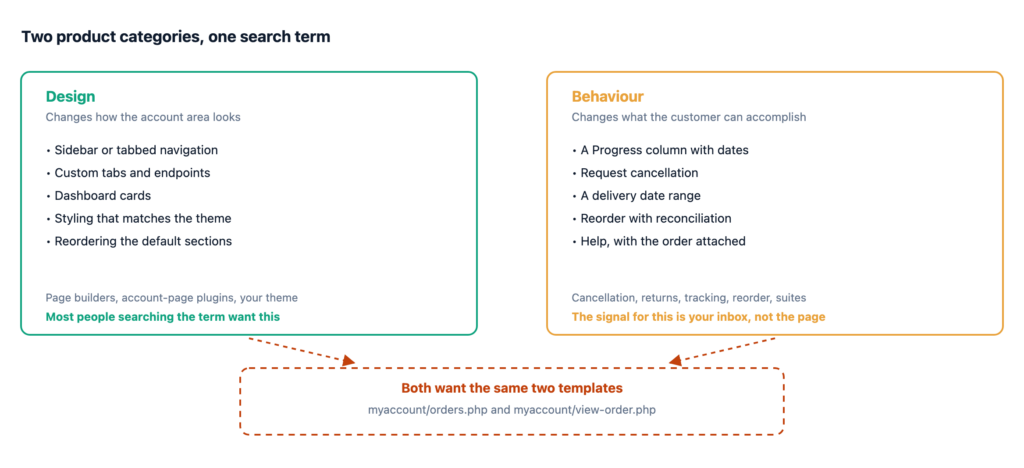
Read down the left column: every row changes what the page looks like and none of them changes what the customer can accomplish. Read down the right: every row adds a capability and none of them would survive a screenshot comparison as a visual improvement.
Describe your problem in one sentence, then look at the verb.
If the sentence is about you looking at the page, it is design. If it is about a customer failing to do something, it is behaviour. The trap is that a badly designed page and a badly functioning page produce the same vague dissatisfaction, and the shop owner reaches for whichever plugin the search results put first.
Worth its own heading because it saves money regularly.
Most commercial WooCommerce themes ship account-page styling, and a good number ship layout controls too — a sidebar or tabbed navigation, dashboard cards, sometimes custom endpoints. It is usually somewhere in the Customizer under a WooCommerce or Account heading rather than anywhere obvious, which is why people buy a plugin for something they already own.
Two minutes in your theme’s options before shopping. And if your theme does provide this, be aware you have now identified the party most likely to be overriding myaccount/orders.php on your site — check WooCommerce → Status → Templates to confirm.
Usually well, sometimes not, and the failure has one cause: both categories want the same two templates.
myaccount/orders.php and myaccount/view-order.php are the contested files. A design plugin wants to replace them to control the layout. A behaviour plugin wants to add to them. If the behaviour plugin works through hooks, everything is fine — its content renders inside whatever markup the design plugin produced. If it replaces the templates too, one of them wins and the other’s work vanishes.
The symptoms are recognisable: your added buttons disappear after switching account-page layouts, or the designed layout reverts to something plainer on the orders tab only. The mechanics of who wins that fight are worth understanding before you buy either.
Two questions to ask before purchase, of both kinds of plugin:
templates/myaccount/ directory in the plugin, or ask support. Hooks coexist; overrides contend.A page-builder approach adds a third contender, since the builder is rendering the page itself. Test the combination on staging before committing — the failure is not a crash, it is your account page quietly losing a feature, which is easy to miss until a customer mentions it.
| What you actually want | Category |
|---|---|
| The account page should match my brand | Design |
| I want custom tabs and endpoints | Design |
| The default dashboard is ugly | Design — or your theme, check first |
| Customers keep emailing to cancel orders | Behaviour |
| Customers cannot tell where their order is | Behaviour |
| I want customers to reorder in one tap | Behaviour |
| Both, on a client store | Both — check the hooks question first |
We are firmly in the behaviour category, and we do not compete on design. That is a deliberate position: the design category is owned by page builders and themes with years of head start, and a behaviour plugin that starts redesigning your account page is a behaviour plugin that will fight your theme. If your account page needs to look better, buy a design plugin, and not from us.