
 PLUGIN COMPARISON
A marketplace order page carries about seven affordances. WooCommerce ships two of them, narrowly. Closing the gap with plugins is entirely possible, and this is what it actually costs.
A note on prices before we start. This post does not quote them, deliberately. Plugin pricing changes, tiers get restructured, and a table of numbers written today is misleading within a year — and a comparison that is quietly wrong about money is worse than one that admits it does not know. What is stable is the structure of the cost, which is the part most people underestimate anyway. Fill the numbers in yourself as you go; the shape of the answer will not change.
Where the parcel is. The most competitive of the five and the one with the best free option: Advanced Shipment Tracking covers carriers, display and bulk entry without charging anything, and the official WooCommerce Shipment Tracking extension is the paid first-party alternative. Several marketplace plugins add branded tracking pages and carrier webhooks on top.
Likely spend: zero. What free actually covers in this category is more than most buyers assume.
WooCommerce itself sells a Customer Order Cancellation extension, and there are several third-party cancellation plugins on the marketplace and on WP.org, generally inexpensive and generally thin. The criteria that separate them are not the ones on the feature lists — what happens to the refund matters far more than how many statuses are supported.
Likely spend: low, annually.
The most expensive of the five, and the widest spread. WooCommerce’s own Returns and Warranty Requests extension sits alongside several third-party RMA plugins with different ideas about exchanges, labels and store credit. Whether you need exchanges is the single question that decides which half of this market you are shopping in, and it is a large price difference.
Likely spend: the largest line, annually.
The odd one out, because WooCommerce already has this. Core’s order_again works; it is limited to completed orders and logged-in customers, and it handles unavailable items with a count rather than an explanation. A one-filter snippet widens the statuses. Paid options mostly add the reconciliation screen and better placement.
Likely spend: zero to low. Do not pay much here.
PDF Invoices & Packing Slips is free and widely used, with a paid tier for the things that get complicated: sequential numbering rules, per-country tax layouts, credit notes. If you are in the EU and need compliant sequential invoice numbering, budget for the paid tier.
Likely spend: zero, or moderate if your accountant has opinions.
Take a store doing 800 orders a month, physical goods, some repeat purchase, guest checkout on, one person handling support. It wants the whole set.
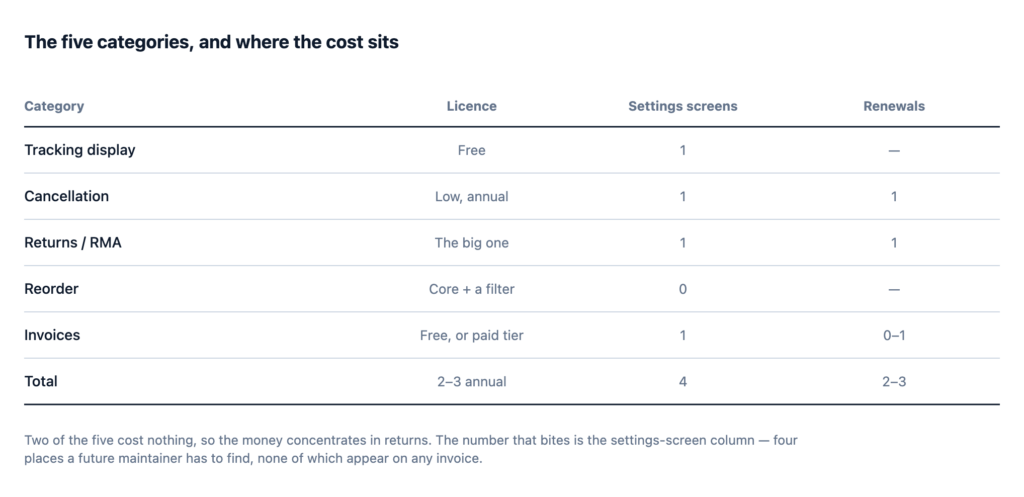
Two or three renewals is manageable. Four settings screens is the number that bites, because it is four places a future maintainer has to find. And the row that is easy to miss: two of the five categories cost nothing, so the money is concentrated in returns and everything else is close to free.
Now add the annual overhead nobody sheets out: an hour per paid plugin for update testing after each WooCommerce major release, plus the first time two of them disagree on the account page. That is the real cost of the stack and it is measured in your afternoons rather than in currency.
templates/myaccount/ directory, or ask support directly. This single answer predicts most of your future trouble on this page.custom_order_tables support. Code that reads orders through get_post_meta() on an HPOS store fails silently.All three are answerable before purchase and none of them appears on a feature list.
Total the licences and you have the small number. Here is the large one.
Four of the five want to render into myaccount/orders.php and view-order.php. Your theme probably customises both already. Each plugin either uses hooks — coexists cleanly — or replaces templates, in which case only one wins.
The compounding is the problem: five plugins produce ten pairs that can conflict, and the symptoms are the kind that appear after an unrelated update. Checking which approach each plugin takes before you buy is fifteen minutes that saves a day.
Five vendors, five release schedules, five quality bars, five sets of WooCommerce-compatibility timing. When WooCommerce ships a change that affects order rendering, you find out five times over an unpredictable period. And when a new WooCommerce major release lands, your account page is only as up to date as the slowest of the five.
The customer-facing result is a page with buttons in different shapes, wording in different registers, and modals that behave differently. One says “Cancel Order”, another says “Request a return”, a third opens a full-page form. Individually fine, together visibly assembled.
In five places, with five conventions. This cost is invisible to you — you configured them, you remember — and lands squarely on whoever inherits the site. For an agency running this across a portfolio it is the dominant cost, not the licences.
The subtle one. A cancellation request lives in the cancellation plugin. A return request lives in the RMA plugin. There is no single list of “customers waiting on a decision”, so your team checks two places, or checks one and forgets the other. The whole point of moving requests out of email was to have one list.
Three situations, and they are common enough that consolidation is not the automatic answer.
You already own three of them and they work. Replacing working software to reduce vendor count is a migration with a real risk of regression, bought with a benefit you cannot demonstrate. Leave it alone.
You need one category done deeply. A store handling a hundred returns a week with exchanges, labels and warehouse integration needs a specialist RMA product, and no consolidated tool’s returns module will match it. Buy the specialist; that category is your business.
You only need one or two categories at all. If your email is entirely “where is it”, buy a tracking plugin and stop. Buying a five-in-one to use one fifth of it is the same overspend in the other direction — and in this specific case the right tool is free.
When you need three or more categories, when nobody is deep in any of them, and when the person maintaining the site in two years is not you.
The gain is not price. It is one settings screen, one update to test, one rendering approach on the account page, one support relationship, and one queue for everything waiting on a human decision.
The honest cost of consolidating: each individual module will be less deep than the specialist you would otherwise have bought. That is a real trade, not a marketing asterisk. If any one of the five is central to how your business runs, buy the specialist for that one and consolidate the rest.
Take the five categories, decide which you actually need — the answer is rarely all five — and price only those. Then add two lines nobody puts on the sheet: an hour a year per plugin for update testing, and half a day for the handover document.
Compare that against a consolidated tool honestly, including the depth you would be giving up. Quite often the answer is a mix: the free tracking plugin, one consolidated tool for the actions, and a specialist for whichever category your business lives on.