
 USE CASES
Every December, the same message arrives dozens of times a day in slightly different words: hi, just checking on my order? It is the most common support email in ecommerce, it spikes exactly when you have the least time, and — this is the frustrating part — the answer is already sitting in your database.
Here is how to make customers stop asking, without hiring anyone or writing a single reply.
Three things happen at once. Carriers get overloaded, so genuine delivery times stretch. Your own fulfilment slows, because volume is up and your pickers are the same people they were in October. And customer patience shortens, because a gift has a deadline attached in a way a normal purchase does not.
The result is that an order which generated no questions in September generates three in December. The customer is not being difficult; they are managing a deadline with no information. A confirmation email from eleven days ago does not answer the question they are asking, and your order page — a status word and a table — does not either.
So they write to you. And because you are busy, you reply slowly, which produces a second email asking whether you got the first one.
The fix is structural: put the answer where the customer already looks. An Order progress list on the order page shows every stage — Placed, Confirmed, Packed, Shipped, Out for delivery, Delivered — each marked Done, In progress or Not yet, with the real timestamp where one was recorded and an estimated delivery range underneath. It updates as the order moves, with no reply from anyone.
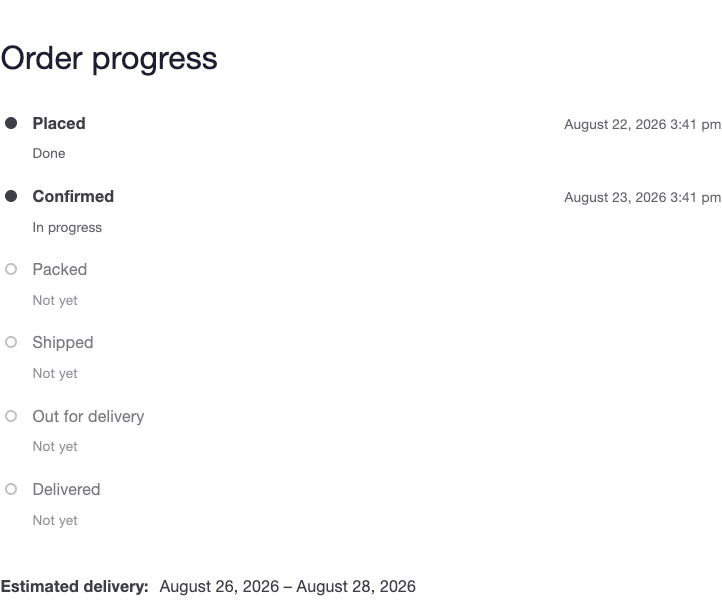
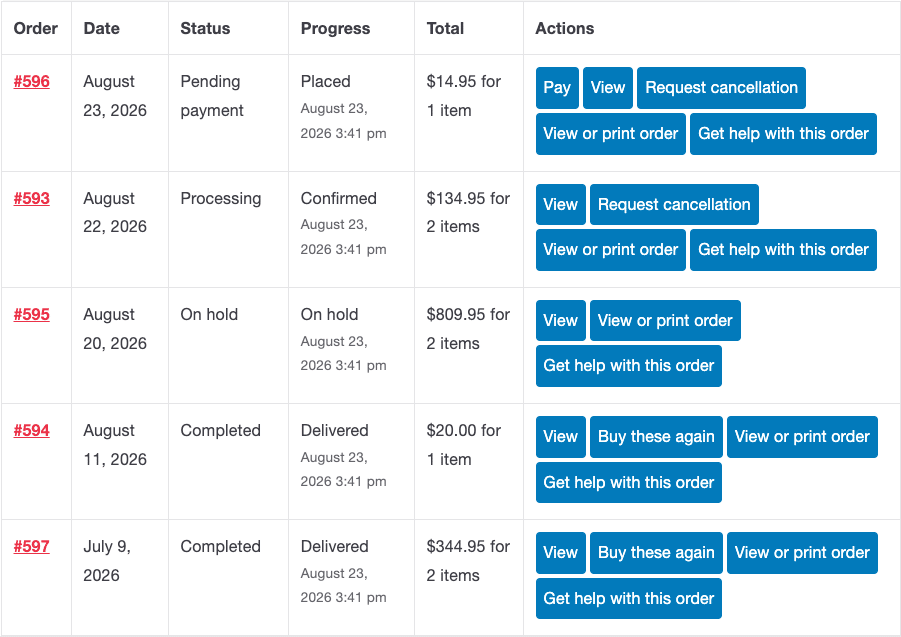
The timeline in Post-Purchase Hub is built from your own WooCommerce statuses, including custom ones added by fulfilment plugins, so it reflects what is genuinely happening rather than a generic five-step template. The My Account order list also gains a Progress column, which matters more in December than any other month: a customer with four open orders sees all four states at once instead of writing to ask about each.
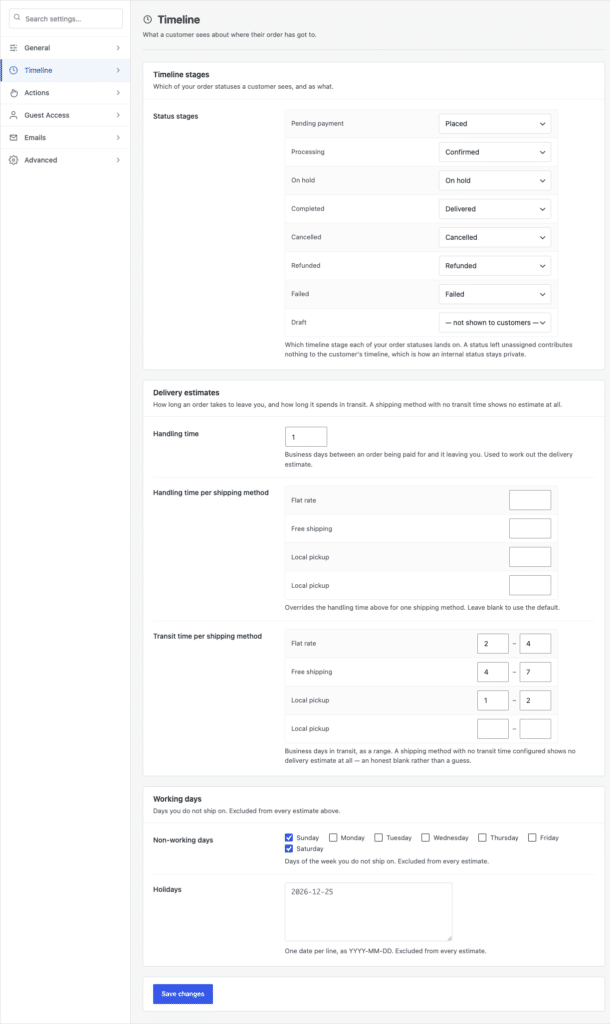
A timeline with no delivery estimate answers half the question. Under Settings → Timeline → Delivery estimates, the estimate is calculated from Handling time in business days and a Transit time per shipping method range, checked against the Working days card below — so a Friday-afternoon order does not promise Saturday delivery, and a closure does not quietly vanish from the maths.
Three things to do before the season starts:
If you run Advanced Shipment Tracking or WooCommerce Shipment Tracking, real tracking data replaces the estimate automatically as soon as a number exists, so the page keeps improving as the order progresses.
The page answers customers who go looking. Emails reach the ones who do not — but be realistic about what WooCommerce actually sends. There is no “shipped” notification in core; Processing order and Completed order are what you have, which makes their wording matter more than the defaults suggest.
You do not need another tool for this: these are ordinary WooCommerce emails, so a pass through your email settings before the season is enough. Two changes matter most. Put {order_number} in the subject line, since customers with several open orders triage from the inbox list. And put a link to the order page in the footer text, so every email you have ever sent doubles as a route back to the live answer.
Some WISMO messages are really cancellation attempts — a gift that will now arrive too late is no longer wanted. Those are better handled as a structured cancellation request than an email thread: the request arrives attached to the order with a reason, and you approve or decline it from one queue at WooCommerce → Requests. During a busy week that is the difference between fifteen minutes and an afternoon.
It is worth reviewing your cancellation rules before the season for the same reason you review handling time. What works at normal volume is not always what works at four times the volume — particularly Response time you promise, which is shown to the customer at the moment they submit.
This does not take support volume to zero, and any tool that claims it will is selling something. It removes the single most common message, which in most stores is a large share of everything arriving during December — leaving your inbox for the ones that genuinely need a person: the damaged parcel, the wrong address, the delivery that never came.
That is the honest version of the win. The same information, delivered without a ticket, for the customers who just wanted to know where their order was.