
 USE CASES
Amazon set the expectation for what happens after checkout, and it did not do it with drones. It did it with a page that always answers the question — and a set of buttons that let customers fix their own problems at two in the morning without talking to anyone.
A small WooCommerce store cannot match Amazon’s logistics. It can match most of the experience, because the experience is mostly information design.
It is tempting to assume the advantage is speed. It is not. Plenty of Amazon deliveries take a week and customers are fine with it, because they knew it would take a week and could watch it happening.
The advantage is certainty. At any moment the customer knows what stage their order is at, roughly when it arrives, and what they can do about it. None of that requires a warehouse network. It requires that your store stops treating order status as internal data.
Only the first is about logistics. The other two are interface, and interface is where a small store competes on level ground.
Out of the box, WooCommerce gives a customer an order number, a line-item table and a status word. There is no sense of sequence, no estimate, and nothing to click. Every question after that page — where is it, can I stop it, can I have it again — has exactly one route: your inbox.
That is the real cost of the default experience. Not lost sales; lost hours. Every WooCommerce store owner has answered “has my order shipped yet?” more times than they can count, and every one of those answers was already in the database.
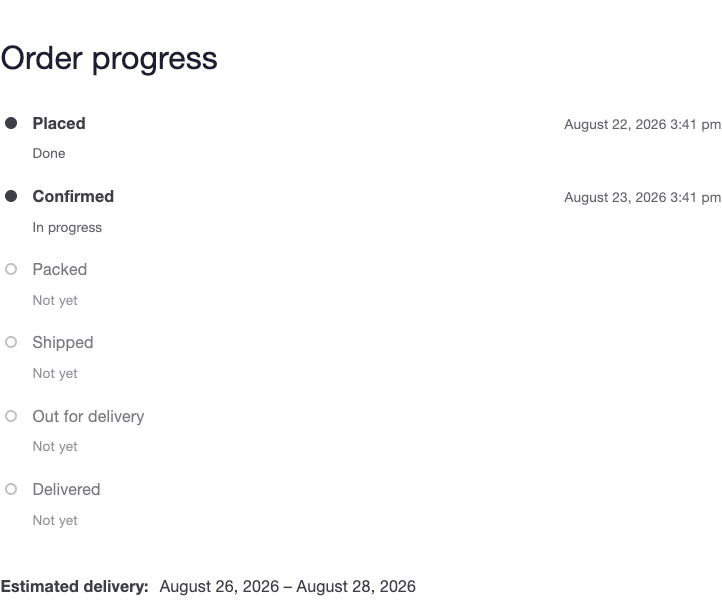
Post-Purchase Hub gives a small store the same core mechanics on the pages your theme already draws: an Order progress list built from your own order statuses, a delivery estimate worked out from your real handling and transit times, and self-service actions on the orders that qualify for them.
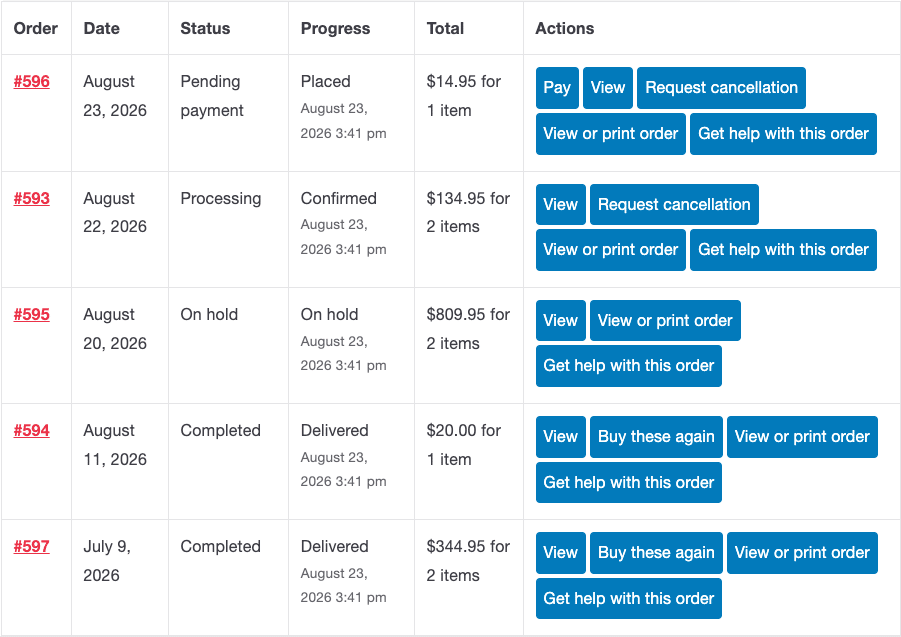
Four actions cover most of what customers want to do alone: Request cancellation, Buy these again (which shows what changed — out of stock, discontinued, more expensive — before it re-adds anything), Invoice, and Get help with this order, which reaches you with the order number, status and items already attached. Each is an independent toggle, and each only appears where it genuinely applies, so nobody is offered a button that leads to a refusal.
The one place where copying Amazon goes wrong is the delivery promise. Big retailers commit to a date because they control the chain. You mostly cannot, and a confident date you miss does more damage than a range you keep.
So the estimate is built from numbers you actually control — handling time in business days, transit time as a range per shipping method, and your own non-working days and holidays excluded from the maths. Where the data is not there, the timeline shows a blank rather than inventing a date. If you run a tracking plugin, real tracking data steps in front of the estimate the moment it exists. Setting the timeline up takes about fifteen minutes, most of it spent mapping your own statuses.
The same honesty applies to cancellations. Amazon can cancel instantly because its systems know precisely where every parcel is. A small store cannot, so a cancellation is submitted as a request you approve — and the dialog says so in its first sentence, along with the response time you promised. Customers are entirely fine with “we usually respond within 24 hours”. What they are not fine with is silence.
The obvious win is fewer support emails, and it is real — “where is my order” is usually the single most common message a store receives, and a live page removes most of it. During a holiday rush that difference is measured in hours per week.
The less obvious win is repeat purchase. A customer who has been through one order with full visibility and one self-service action that worked has learned something no amount of homepage copy conveys: that buying here is low-risk. That is what brings them back, which is why the biggest effect shows up on the second order rather than the first.
There is a third, quieter benefit. Every cancellation request arrives with a reason attached and is stored that way, so a month of them is the cheapest product research you will run — a size chart that misleads, a delivery estimate that reads slower than it is, a photo that oversells a colour.
Worth knowing before you set expectations internally. It never issues a refund and never touches a payment gateway. It never cancels an order by itself. It creates no tracking numbers and generates no PDFs — it reads what your tracking and invoice plugins already store. And it does not replace your theme’s order pages unless you turn that on, which is not the recommended setting.
That list is short on purpose, and it is the reason the rest can be trusted.
Start with visibility, because it reduces email volume without requiring any new decisions from you: the order status timeline first, then self-service cancellations once you are comfortable with the request queue. Installation is a five-minute job, and branding your order emails is the twenty minutes that makes the whole thing look like it was always part of your store.