
 USE CASES
A standard return flow assumes you can put your hands on the item: it comes back, you inspect it, you restock it, you refund. Dropshipping breaks every step. The parcel is somewhere in a supplier’s network, the return address is not yours, and the decision usually is not yours either.
The friction is real and no plugin removes it. What you can remove is the part that actually costs you time — digging through email threads to work out which order a customer means and what the supplier already said.
A dropshipped return has a step a normal return does not: a conversation with the supplier that the customer cannot see and does not care about. That handoff is where requests stall. The customer emails you, you email the supplier, the supplier takes two days, and meanwhile the customer emails again because nothing has visibly happened.
Two things make it worse. Return addresses and policies differ per supplier, so there is no single rule you can publish. And you often cannot confirm receipt yourself, which means the last step — the refund — waits on somebody else’s inbox.
Worth being precise, because it changes how you build the rest of your process. Post-Purchase Hub does not run an RMA workflow. It does not generate return labels, track a returned parcel, or issue refunds — the readme is explicit that it never touches a payment gateway, and it generates no PDFs of any kind.
What it gives you is the intake and the record. Get help with this order is a message form that reaches you with the order number, status and items already attached. Cancellation requests — which for a dropshipper are far more valuable than returns, for the reason below — arrive in a queue at WooCommerce → Requests with the customer’s chosen reason, their note, and an Internal note (not shown to the customer) box on the decision screen.
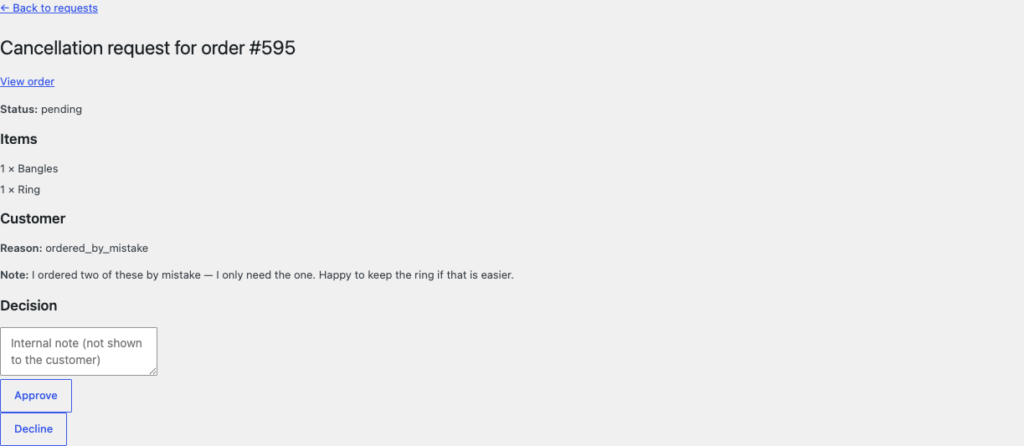
That internal note does more work for a dropshipper than for anyone else. It is where “supplier confirmed 14 Mar, RMA #4471” lives, attached to the request rather than buried in a mail thread — and because requests also surface on the WooCommerce order screen, the context is on whichever page you happen to open. If you want that history to survive, check Keep resolved requests for on the Advanced tab: it is a number of days, and zero keeps everything.
The highest-leverage change for a dropshipper is not a better return process. It is intercepting more orders before the supplier dispatches them, because a cancellation costs you nothing and a return costs shipping in both directions plus a supplier conversation.
Eligibility is based on order status, so the question is: how long does an order sit with you before it is forwarded? That gap is your real window.
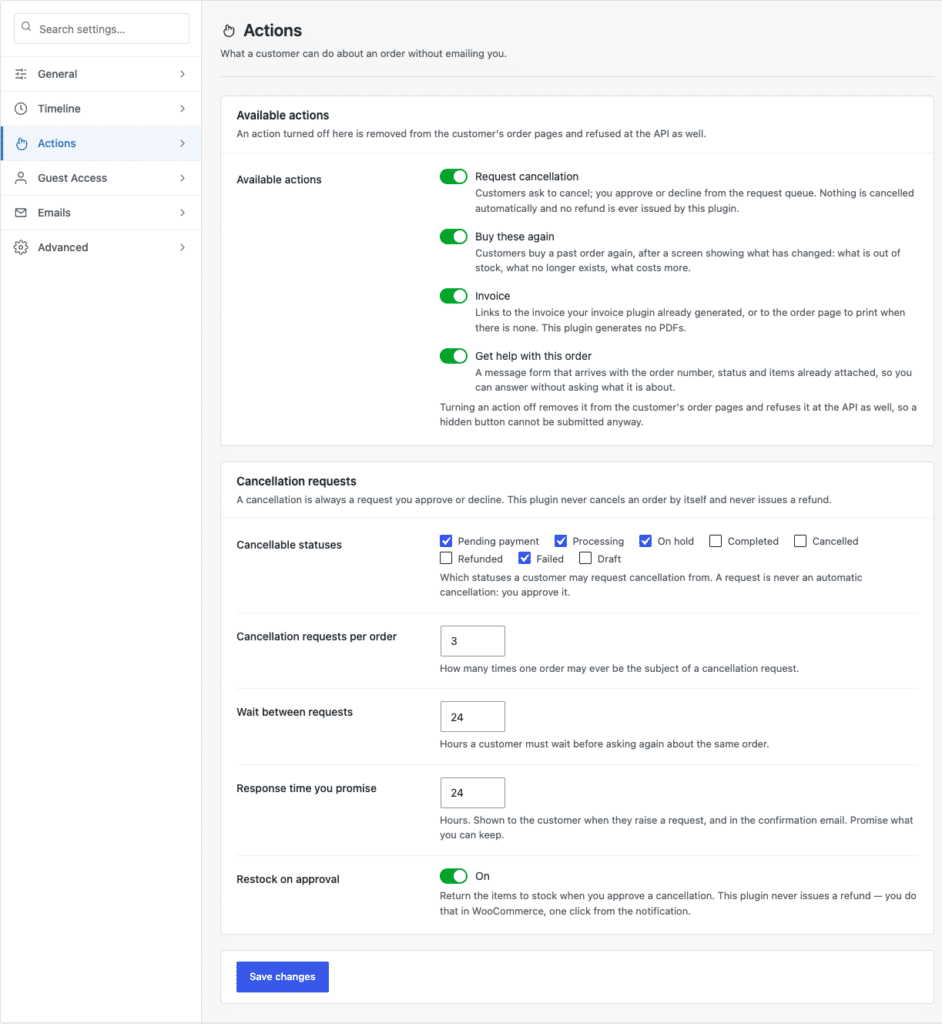
Leave Restock on approval off unless you genuinely mirror supplier stock in WooCommerce. For most dropshippers the stock number is nominal, and restocking on approval just makes it less accurate. The queue is reviewed by hand either way, which is the right shape when a supplier has to be consulted before you can say yes.
The most common dropshipping policy mistake is copying a normal store’s thirty days from delivery. That assumes the customer received the item roughly when you thought they did, and that a return reaches somewhere useful in a few days. Neither is safe when a supplier ships from overseas.
Build the window from the actual chain: supplier dispatch time, transit, plus the days a return takes to reach the supplier and be confirmed. Then publish a window you can hold on the slow version of that chain, not the fast one. A shorter, reliable window generates far fewer disputes than a generous one you cannot honour.
A large share of dropshipping returns are not product problems. They are timing problems: the customer expected the parcel in a week, it took three, and by the time it arrived they no longer wanted it.
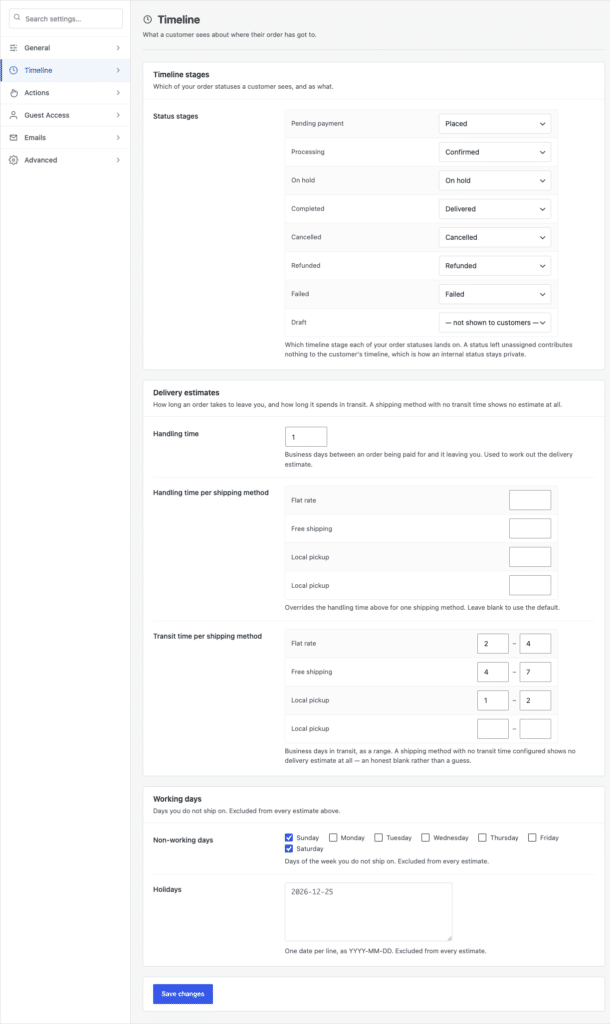
So set Handling time and the Transit time per shipping method ranges from your supplier’s real performance, not the optimistic figure on their rate card. The timeline then shows a window the customer can plan around — and where a method has no transit time configured it shows no estimate at all, a deliberate blank rather than a guess. Uncomfortable to publish, much cheaper than a missed promise.
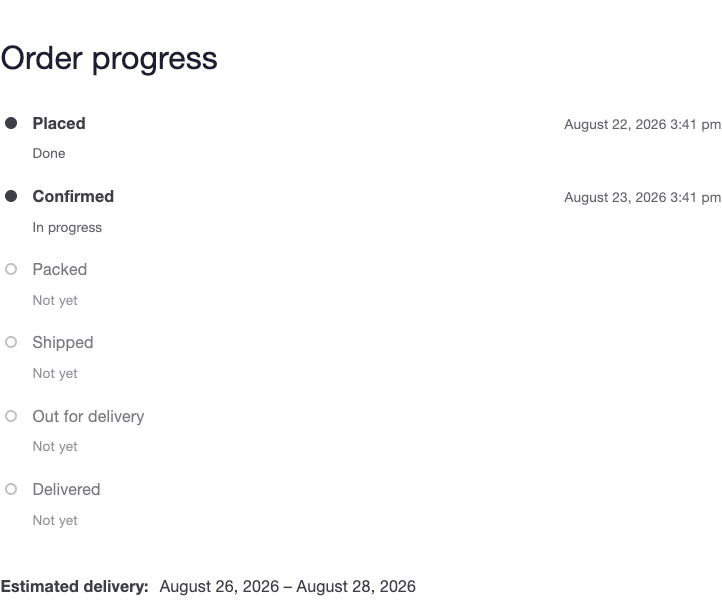
If you use a tracking plugin, real tracking data replaces the estimate as soon as the supplier provides a number — which is usually the point at which dropshipping customers stop worrying. Advanced Shipment Tracking and WooCommerce Shipment Tracking are supported out of the box, and other sources can be wired in through a filter.
Being upfront about longer processing, paired with a live status the customer can check themselves, does more for trust than a short window you cannot consistently meet. Say the shipping time on the product page, repeat it in your order emails, and show it on the order page. Customers who would have returned out of impatience mostly self-select out before buying — a better outcome than a return you have to process.
Then keep the reason data. A month of cancellation and help-request reasons usually points at one supplier, one product, or one shipping method doing most of the damage. See setting cancellation windows and return policies for how to turn that into a policy you can actually defend.