
 USE CASES
Subscription boxes have a support problem one-off stores do not: the same customer generates a new order every month, and each of those orders can produce the same questions. Where is this month’s box? Can I skip it? I meant to cancel before you charged me.
Multiply that by a few hundred subscribers and the post-purchase experience stops being a nice-to-have. Here is where Post-Purchase Hub fits — and, just as importantly, where it does not.
Be clear about the boundary, because it decides what you still need. Your subscriptions plugin owns the subscription itself: the billing schedule, pausing, skipping a cycle, and cancelling the subscription. Post-Purchase Hub works on orders — including every renewal order that subscription generates.
That turns out to be most of where the support load comes from. Subscribers rarely ask about the schedule; they ask about the specific box that was supposed to arrive last Tuesday.
A customer who cannot find a clear way to stop paying you does not shrug and stay subscribed. They call their bank.
A chargeback costs more than the box was worth, in fees and in processor standing, and unlike a cancellation it is not a conversation — you find out after the decision has been made. Every friction point between “I want to stop” and stopping raises the odds of that outcome.
So the goal is not retention through obstruction. It is making the exit obvious enough that it stays a cancellation, and visible to you early enough to respond.
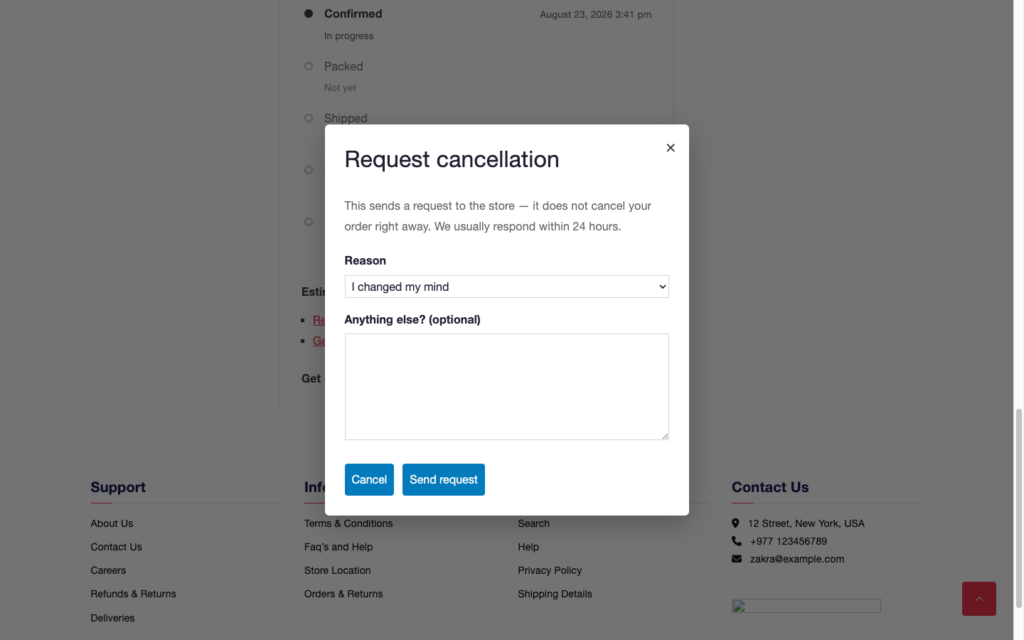
The dialog states plainly that it is a request and carries the response time you configured. It asks for a Reason from a dropdown and offers an Anything else? (optional) box — which gives you something an email thread never does: structured, stored data on why people leave.
One thing to set up alongside it: the customer-facing Cancelled order email in WooCommerce is often disabled by default. If you approve a request and that email is off, the customer gets silence at the most sensitive moment in the relationship. A pass through your email settings fixes it in a minute.
A subscription box has a rhythm, and subscribers learn it fast. The box that normally arrives on the 8th and has not arrived by the 11th generates a message. Every month. From different people.
An Order progress list on each renewal order answers that without a reply. It is built from your own WooCommerce statuses, so if your fulfilment has a packing week and a dispatch day, the statuses you already use map onto the stages customers see rather than being replaced by a generic “Processing”.
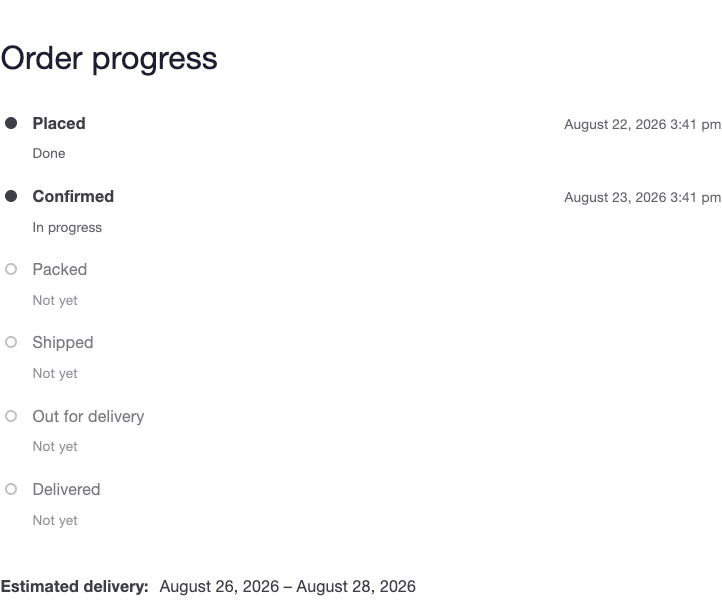
The delivery estimate matters more here than in a normal store, because subscribers compare this month against last month. Set Handling time to what your packing cycle actually takes and a Transit time range on each shipping method, and the estimate holds month after month. Miss it consistently and you have trained a few hundred people to check in.
A long-running subscriber has a year of orders in their account. The My Account list gains a Progress column showing each order’s current stage and timestamp, which turns that history into something readable at a glance — and it is the page to send them to when they ask about a box from three months ago.
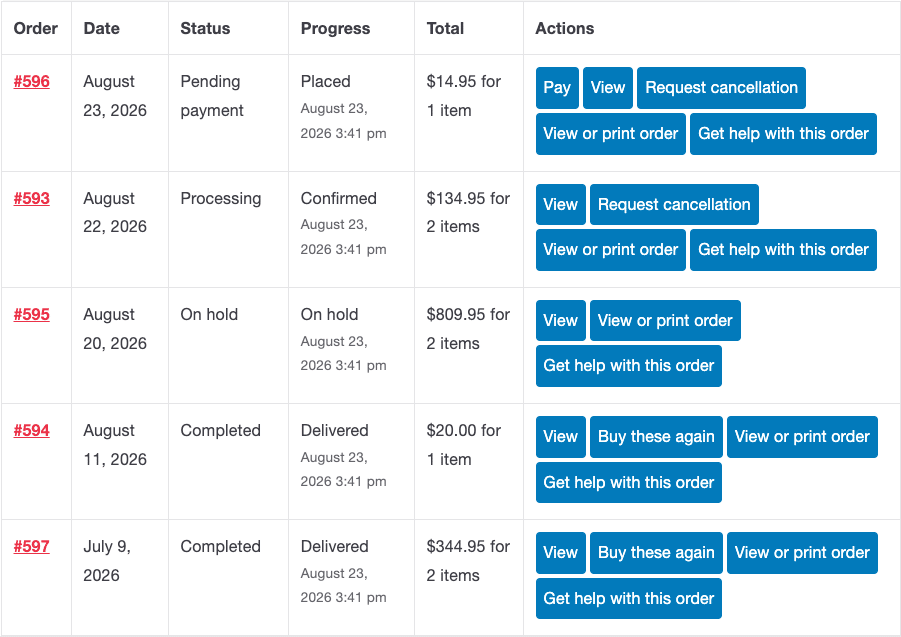
Two of the self-service actions earn their place immediately for subscription businesses. Invoice removes the recurring “can you send me a receipt for last month” message, especially from business subscribers — it links to whatever your invoice plugin generated, and falls back to a printable order page when there is none. Get help with this order gives you a support intake that arrives with the order number, status and items already attached, instead of an email saying “my box” that needs three replies to identify.
The most common subscription complaint is being charged for a cycle the customer meant to stop. It is also the one most likely to become a chargeback, because the customer feels caught rather than served.
Two things reduce it. A renewal reminder a few days before billing — your subscriptions plugin sends this; make sure it is on and that it states the date and the amount plainly. And a genuinely visible route to cancel, rather than one buried behind a support form.
Where a charge has already gone through, the cancellation request on that renewal order gives the customer somewhere to go that is not their bank. You still make the decision, and the refund remains a WooCommerce action on the order — the plugin never touches your gateway.
Renewal orders have a rhythm that makes the cancellation rules easier to set than in a general store. Requests are eligible based on order status, so the practical question is which status a renewal order sits in before it enters your packing run — that gap is your real window, and for most box businesses it is generous.
Then spend twenty minutes on your order emails. For a subscription business those arrive every single month, which makes them the most-seen thing your brand produces — and the easiest place to make a box feel like a membership rather than a transaction.