
What the plugin stores #
- One reference per user — the attachment ID of their picture, in their user profile.
- The image files — attachments in your media library, under
uploads/wpmake-advance-user-avatar/for photos uploaded through the widget. - Your settings — a single option row.
Nothing is sent anywhere else. There are no external requests, no analytics and no third-party service involved in showing an avatar.
Deactivating #
Deactivating the plugin deletes nothing. Avatars stop being shown — WordPress goes back to Gravatar — and everything is still there when you activate it again. This is the safe thing to do if you are troubleshooting.
Deleting the plugin #
By default, deleting the plugin also leaves your data alone: the photos stay in the media library and the references stay on the users, so re-installing picks up where you left off.
If you would rather deletion cleaned up after itself, switch on Delete all avatars and settings when the plugin is deleted in the Advanced section.
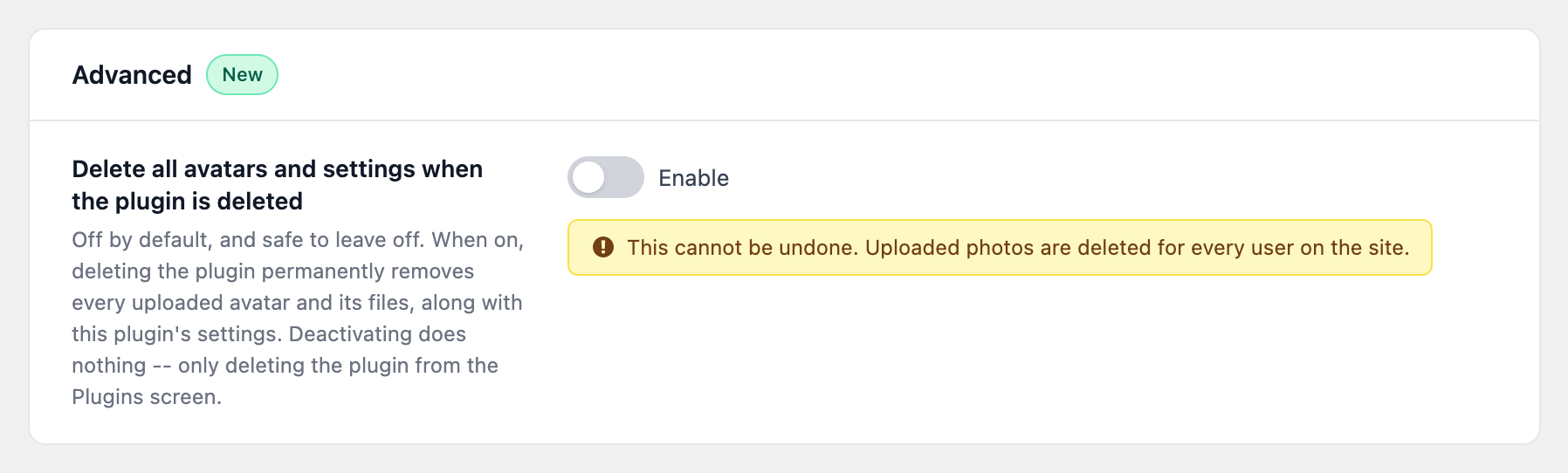
With this on, deleting the plugin from the Plugins screen permanently removes every uploaded avatar and its files, along with the plugin’s settings. It cannot be undone, and it applies to every user on the site. Deactivating still does nothing — only deleting.
Two things it does not touch, even when switched on: images your users picked out of the media library rather than uploading through the widget, and any image that is in use elsewhere on the site.
On a multisite network #
Each site answers for itself. A site that left the setting off keeps its avatars even if another site on the network switched it on, and uploads stay in the uploads directory of the site they were made on.
Removing one person’s photo #
You do not need any of this to honour a single request. Clear that person’s avatar as described in Removing an avatar, then delete the attachment from Media if the file should go too.


