
Time Locker → Settings holds four settings in three cards. They apply everywhere until a page overrides them.
Lock Behavior #
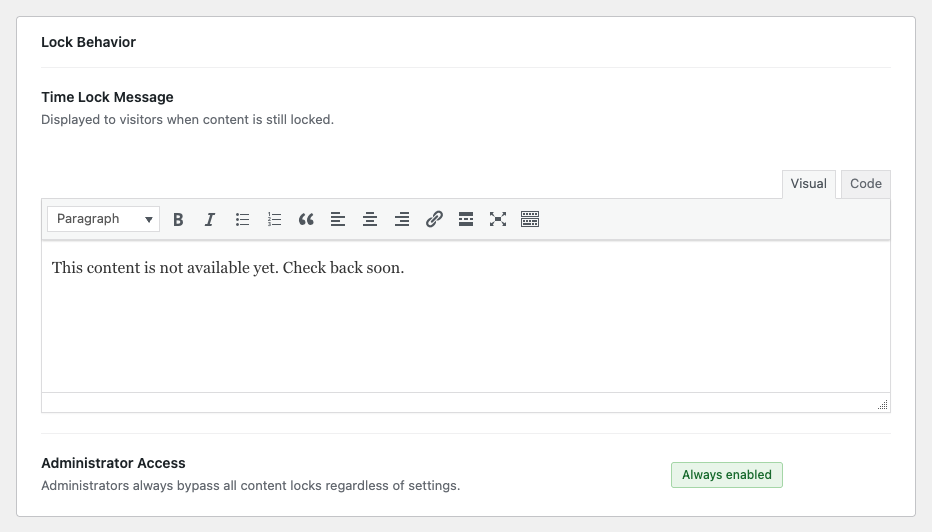
Time Lock Message is what visitors read in place of your content. The default — “This content is not available yet. Check back soon.” — is deliberately bland; replace it with something that tells people when to come back and what to do meanwhile.
Administrator Access is not a setting, it is a statement: people who can edit the page always see it. That includes administrators, and on a page they can edit, editors and authors too. It cannot be switched off, which is what lets you check your own content without unpicking the lock.
Countdown Timer #
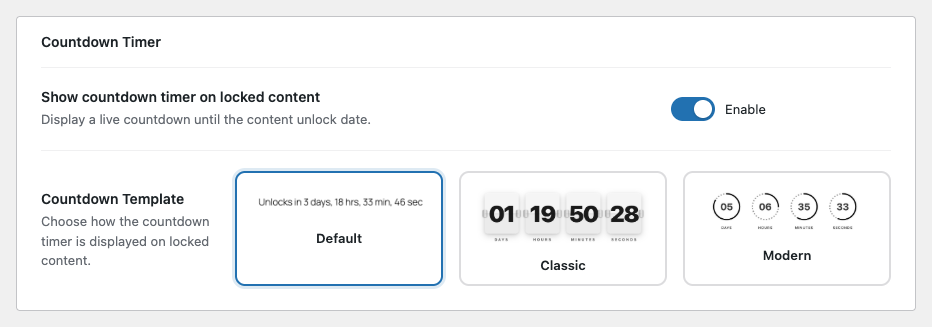
Show countdown timer on locked content is on by default. With it on, the card carries a live timer counting down to the unlock moment; with it off, visitors see only your message.
Countdown Template chooses the look:
- Default — one line of text, e.g. “Unlocks in 3 days, 4 hrs, 02 min, 38 sec”. Quiet, and safe with any theme.
- Classic — flip-card tiles for days, hours, minutes and seconds.
- Modern — four rings that empty as the time runs down.
All three are shown in What visitors see while content is locked.
Appearance #

Custom CSS Class for Locked Placeholder is the class put on the locked card’s container, tcl-locked-content by default. Change it if you want to hang your own styles off a name of your choosing; leave it alone otherwise. Nothing breaks either way.
Remember to press Save Changes — nothing on this screen saves by itself.


