
Customers who checked out as guests have no account to log into. Guest order lookup gives them a way to reach their order using the order number and the email address on it.
This is the one feature the setup wizard will not turn on for you. It adds a publicly reachable form to your site, so it is switched on knowingly or not at all.
Turning it on #
Go to Settings → Guest Access. There are two switches, and both are required — ticking only the first saves as off.
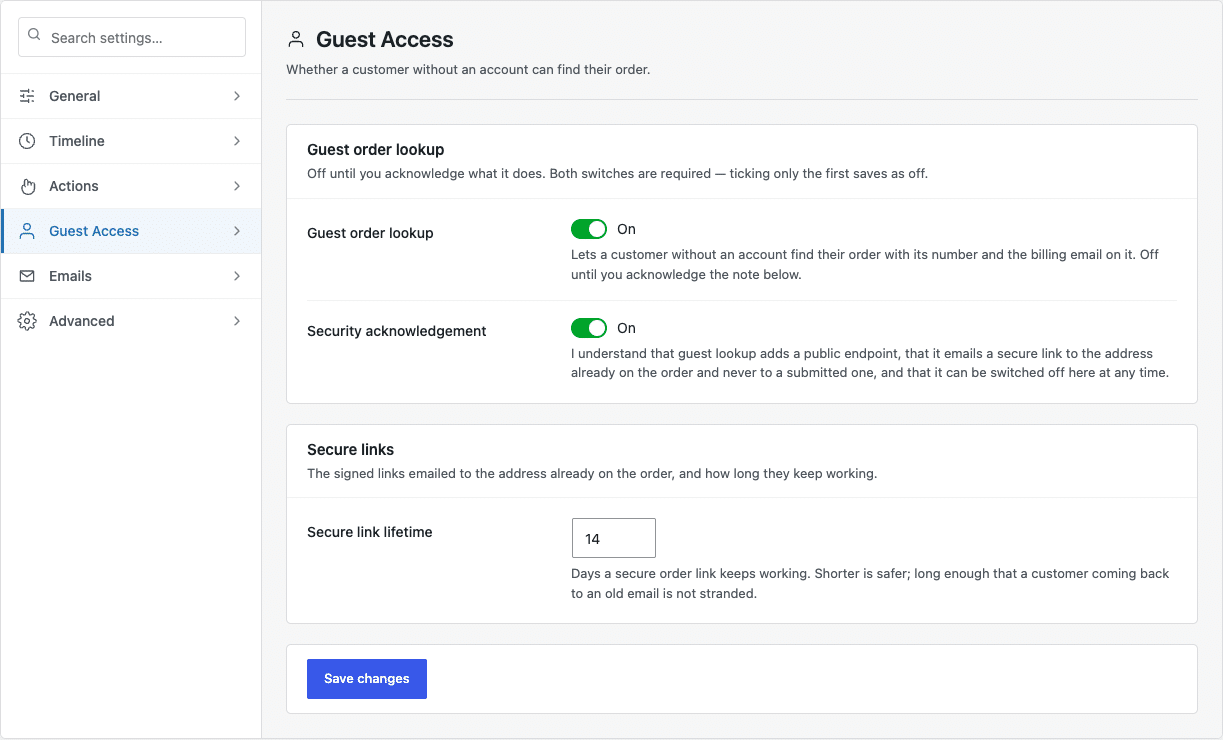
- Guest order lookup — the feature itself.
- Security acknowledgement — confirming you understand what it adds.
How it protects the customer #
The form never shows an order directly. It emails a secure link to the address already on the order — never to whatever address was typed into the form. Someone who guesses an order number therefore learns nothing, because the email goes to the real customer.
- The form is rate limited, so it cannot be used to test order numbers in bulk.
- Links are signed and expire. Secure link lifetime controls how long they last; the default is 14 days.
- Nothing is revealed without both the correct order number and the correct email address.
Adding the form to your site #
Create a page — “Track my order” is a good name — and add the shortcode [pph_order_lookup] to it.

Link that page from your site’s footer or your order confirmation emails so guests can find it.


