
The Status card at the top of Settings → General is where to look first when something seems wrong. Nothing on it is a setting — it is what the rest of your configuration has added up to.
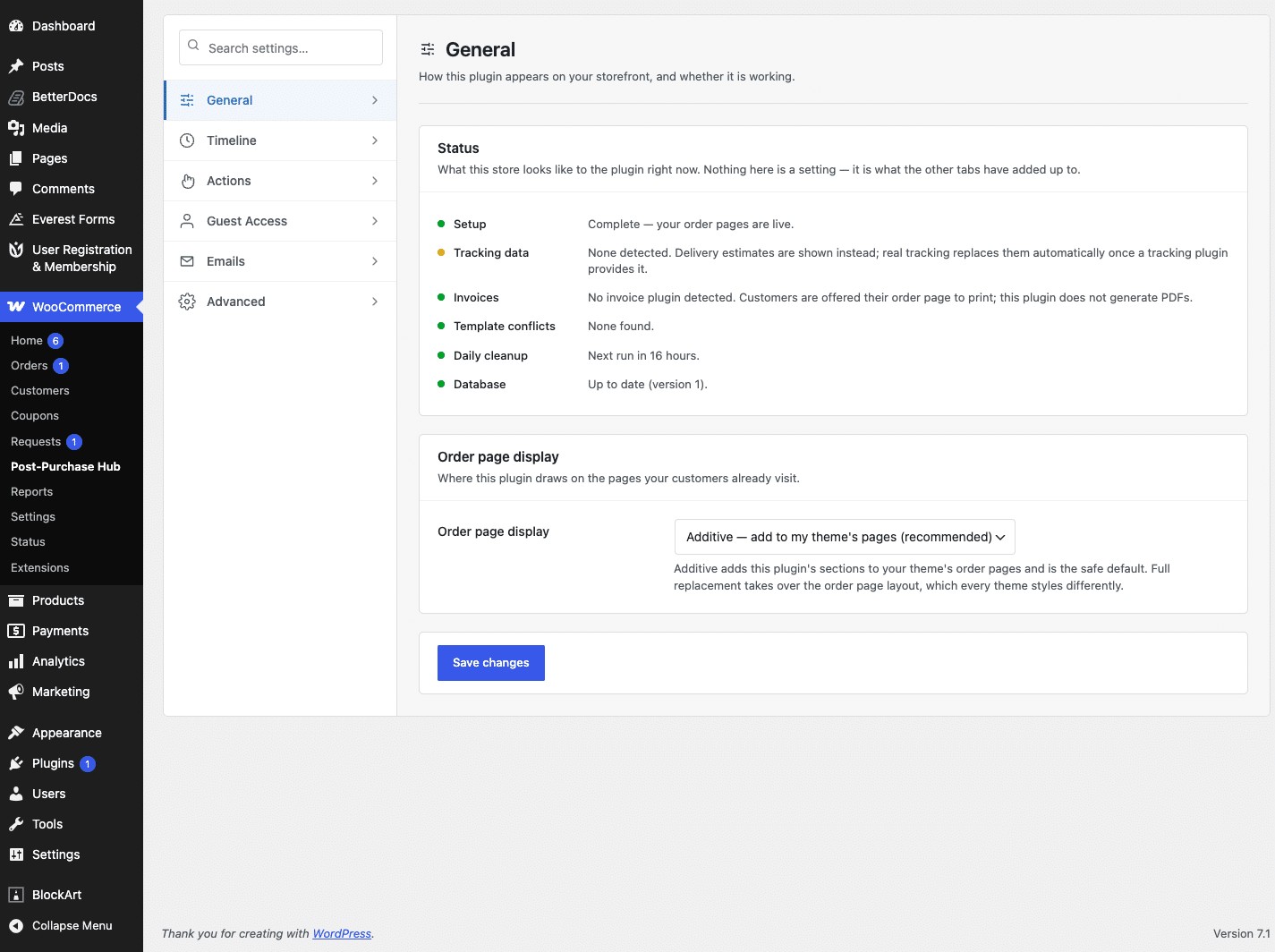
What each row means #
- Setup — whether the wizard has been finished. Until it has, customers see nothing at all.
- Tracking data — whether a tracking plugin was detected. Without one, customers see delivery estimates instead, which is fine.
- Invoices — whether an invoice plugin was detected. Without one, the invoice action offers the order page to print.
- Template conflicts — whether your theme overrides the WooCommerce order templates. If it does, full replacement stays off until that is resolved.
- Daily cleanup — the scheduled job that removes old resolved requests. If it says it is not scheduled, deactivating and reactivating the plugin re-creates it.
- Database — whether the plugin’s own tables are up to date.
Common situations #
Nothing appears on the storefront. Check the Setup row first. If it says the wizard is unfinished, finish it — that is the switch that brings the storefront up.
No delivery estimates. Almost always a shipping method with no transit time set. See Delivery estimates.
Buttons missing for some orders. That is usually correct: the actions available depend on the order’s status and on any request already pending against it.
Checking the status panel


